When choosing smart locks, understanding deadbolt grades helps you match security to your needs—Grade 1 offers the highest strength for commercial spaces, while Grade 2 is ideal for most homes. “Secure” doesn’t just mean physical strength; it involves encryption, biometric features, and resistance to hacking. Smart locks combine these digital and physical protections, making your home safer. Want to learn more about how these features work together for real security? Keep exploring.
Key Takeaways
- Deadbolt grades (Grade 1, 2, 3) indicate physical strength and durability, with Grade 1 being the most secure for commercial use.
- “Secure” in smart locks combines encryption, biometric security, and tamper resistance, not just physical lock strength.
- Higher-grade deadbolts (Grade 1) offer better resistance against forced entry, but digital security features are equally crucial.
- Smart lock security relies on encryption, biometric identification, and remote monitoring to prevent hacking and unauthorized access.
- Modern security benefits come from integrating physical robustness with digital safeguards, ensuring comprehensive protection.
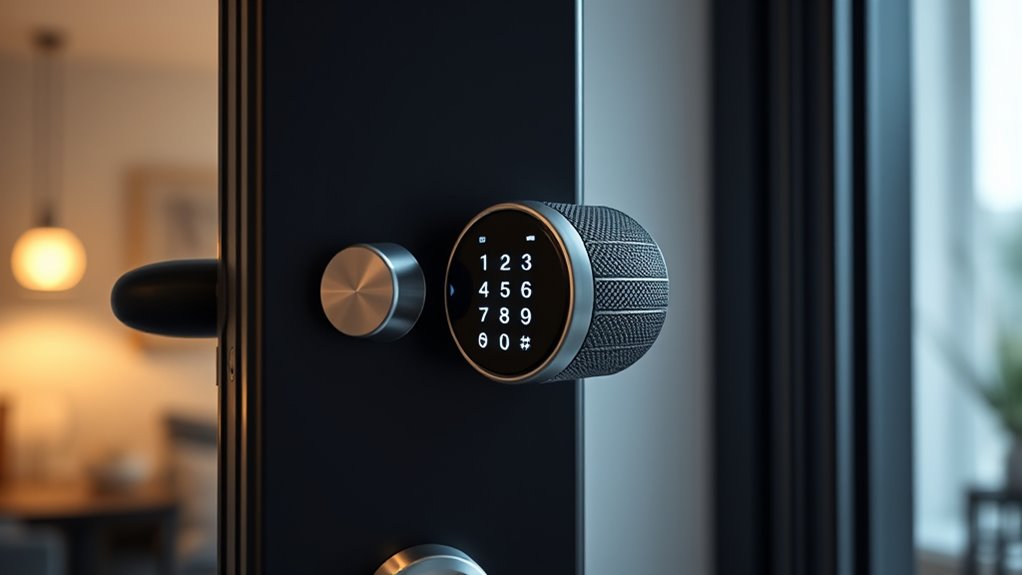
Have you ever wondered how smart locks can transform the way you secure your home? They offer more than just convenience—they redefine what it means to keep your space safe. One of the key advantages of smart locks is their ability to enable keyless entry, eliminating the need for physical keys and reducing the risk of lockouts or lost keys. Instead of fumbling with keys or worrying about copying, you can access your door with a code, a smartphone app, or even biometric security. Biometric features, such as fingerprint scanners, provide an advanced layer of security because only you and those you authorize can access the door. This technology makes it nearly impossible for intruders to bypass your lock using traditional methods, giving you peace of mind.
Smart locks offer keyless entry and biometric security for enhanced home protection.
When considering smart locks, it’s essential to understand the different deadbolt grades and what they mean for your security. Deadbolt grades, typically rated by organizations like ANSI, indicate the strength and durability of the lock. Grade 1 is the highest, designed for commercial use, and offers the most robust security features. Grade 2 is suitable for residential applications, providing a solid level of security that resists forced entry. Grade 3 is the lowest, often found in interior doors or less vulnerable areas, and offers basic security. Knowing these grades helps you choose a lock that aligns with your security needs, whether you’re protecting a single-family home or a rental property.
The term “secure” can be subjective, but with smart locks, it often means more than just physical strength. It involves how well the lock integrates with your lifestyle and how resistant it is to hacking or tampering. Many smart locks incorporate encryption protocols and security features to prevent unauthorized access through digital means. Features like biometric security add an extra layer of protection—your fingerprint or facial recognition becomes your unique key. This makes it much harder for intruders to break in, especially compared to traditional keyed locks that can be picked or bumped. Additionally, understanding lock durability standards helps in selecting a product that offers reliable long-term security.
Ultimately, safe doesn’t just mean a sturdy deadbolt; it’s about all-encompassing protection that adapts to modern threats. Smart locks with keyless entry and biometric security give you control and flexibility, letting you monitor access remotely and keep logs of who enters and leaves your home. They’re a leap forward from conventional locks, blending physical security with digital safeguards to keep your home safer than ever before.

KLLOQUE Fingerprint Door Lock, Smart Fingerprint Door Knob with Lock, Biometric Door Locks with App Control & Key, Keyless Thumbprint Entry Door Locks for Bedroom, Front Door, Home, Apartment-Silver
3-IN-1 BIOMETRIC DOOR KNOB: The ultimate security solution for your smart home or office. Whether you prefer the…
As an affiliate, we earn on qualifying purchases.
As an affiliate, we earn on qualifying purchases.
Frequently Asked Questions
How Do Smart Locks Differ From Traditional Deadbolts?
Smart locks differ from traditional deadbolts by offering keyless convenience, letting you open your door via smartphone or keypad. They often feature advanced security, making them more durable and difficult for intruders to pick or force open. Unlike traditional deadbolts, smart locks can be remotely controlled, providing greater flexibility and control. This modern approach enhances your home’s security while eliminating the need for physical keys, making access more seamless and secure.
Can Smart Locks Be Hacked or Compromised?
Smart locks can be hacked like a house with an open window, so cybersecurity risks and hacking vulnerabilities exist. While manufacturers implement encryption and security protocols, clever hackers may still find ways to exploit weaknesses. To protect yourself, keep firmware updated, use strong passwords, and enable two-factor authentication. Staying vigilant minimizes the chances of unauthorized access, ensuring your smart lock remains secure against potential threats.
Are Smart Locks Compatible With All Home Security Systems?
Smart locks aren’t compatible with all home security systems, but many offer broad accessories compatibility and remote access options. You can usually connect them with popular hubs or smart home platforms, though some models may require specific accessories. Check your system’s compatibility beforehand. With remote access, you can lock or open your door from anywhere, making your setup flexible and convenient. Just make certain your smart lock integrates seamlessly with your existing security system.
What Happens During a Power Outage or Wi-Fi Failure?
During a power outage or Wi-Fi failure, your smart lock may revert to backup options like a physical key or a battery-powered keypad. You’ll still be able to release your door without internet or power, ensuring security isn’t compromised. Some smart locks also have low-battery alerts to notify you before power runs out. It’s essential to check your lock’s backup features so you stay protected even when Wi-Fi or power fails.
Do Smart Locks Require Professional Installation?
Imagine gently fitting a puzzle piece into place—that’s what smart lock installation feels like. You don’t always need a professional because many models are designed for DIY setup, but installation concerns and compatibility issues can arise. If you’re comfortable with basic tools and follow instructions carefully, you can usually install it yourself. However, for complex systems or uncertain compatibility, hiring a pro guarantees everything works seamlessly and securely.

ULTRALOQ U-Bolt Smart Lock, 5-in-1 Keyless Entry Door Lock with App Control, Keypad Deadbolt, Auto Unlock, Auto Lock, Smart Door Lock, Smart Locks for Front Door, ANSI Grade 1, Black
5-in-1 Keyless Entry Door Lock: Keypad + Smartphone App + Auto Unlock + Smart Watch App + 2…
As an affiliate, we earn on qualifying purchases.
As an affiliate, we earn on qualifying purchases.
Conclusion
As you stand before your door, the soft click of your smart lock reassuringly seals your home’s future. Knowing its deadbolt grade and what “secure” truly means transforms your entryway into a fortress of confidence. It’s more than just a gadget; it’s a silent guardian, blending technology with peace of mind. With each tap and turn, you’re not just releasing a door—you’re opening a sanctuary built on trust, strength, and the promise of safety.

Philips Wi-Fi Door Lock, WiFi Smart Lock Keyless Entry Deadbolt for Front Door, Compatible with Alexa & Google Assistant, Remote Control, Built-in WiFi, APP Fingerprint Passcode Unlock, Auto Locking
𝐅𝐥𝐞𝐱𝐢𝐛𝐥𝐞 𝐖𝐚𝐲𝐬 𝐭𝐨 𝐔𝐧𝐥𝐨𝐜𝐤: Unlock the way you want: app, passcode, fingerprint, physical key, or voice via Alexa/Google…
As an affiliate, we earn on qualifying purchases.
As an affiliate, we earn on qualifying purchases.

eufy Security Smart Lock C220, Fingerprint Keyless Entry Door Lock, Built-in Wi-Fi, App Remote Control, Front Door Smart Lock Deadbolt, 8Months Battery, Reliable Power, IP53 Waterproof, BHMA Grade 3
8 Months Battery Life: With 8 AA batteries, Smart Lock C220 runs around 8 months. Experience ultimate convenience…
As an affiliate, we earn on qualifying purchases.
As an affiliate, we earn on qualifying purchases.