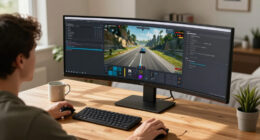

If your monitor is too low, you tend to tilt your head forward, pulling your neck into strain and causing discomfort over time. This position forces your muscles to work harder and can lead to long-term pain and tension. The mistake is not ensuring your screen is at eye level, which helps keep your neck aligned naturally. Correcting this can greatly improve your comfort and posture, and there’s more to discover on how to avoid this common mistake.

Get school and study supplies delivered free — and shop member deals
- Fast, free delivery on millions of items
- Access to Prime Big Deal Days deals on October 6–7
- Prime Video, Amazon Music and more included
Key Takeaways
- Positioning the monitor too low causes the neck to tilt forward, straining neck muscles.
- Incorrect height forces you to look down, increasing forward head posture and tension.
- A monitor below eye level encourages prolonged forward neck pulling, leading to discomfort.
- Proper screen height aligns the top of the monitor with eye level, preventing forward head tilt.
- Small height adjustments can correct forward pull and promote natural, neutral neck posture.

Have you ever noticed how your screen height can subtly impact your comfort and productivity? The way you set up your workspace plays a crucial role in maintaining an ergonomic setup, especially when it comes to posture correction. When your monitor is too low or too high, it can cause you to crane your neck forward or tilt your head unnaturally, leading to discomfort and even long-term musculoskeletal issues. The key is to position your screen at the right height so you can look straight ahead without straining your neck.
Most people tend to overlook the importance of proper screen height, but small adjustments can make a big difference. Ideally, your monitor should be at eye level or just slightly below it. This way, your head remains balanced, and you avoid the tendency to lean forward or downward. When your screen is too low, you instinctively tilt your chin downward, which puts unnecessary stress on your neck muscles. Over time, this can cause pain, stiffness, and even headaches. By setting your monitor at the correct height, you promote better posture correction and reduce these risks.
Proper monitor height prevents neck strain, pain, and headaches by supporting natural posture and reducing unnecessary muscle tension.
Creating an ergonomic setup involves more than just adjusting the height. You should also consider the distance from your eyes—your monitor should be about an arm’s length away. This helps prevent eye strain and encourages a natural neck position. Keep in mind that your monitor’s top edge should align with your eye level, and the screen should be tilted slightly backward if needed for comfort. These small tweaks ensure that your head remains in a neutral position, minimizing forward pulling of the neck. Additionally, understanding ergonomic principles can help you optimize your workspace for long-term comfort and health. Proper monitor placement is essential for maintaining good posture, as it directly influences your neck and overall body alignment. Incorporating adjustable features, such as monitor arms, can further facilitate ergonomic adjustments that support your posture throughout the day. Being aware of body mechanics can also help you develop habits that promote better alignment and reduce strain during your work routine. Regularly practicing correct posture habits can prevent the development of chronic discomfort and promote overall well-being.
If you find yourself constantly adjusting your position or feeling discomfort, it might be time to revisit your workspace arrangement. Using adjustable monitor arms can help you fine-tune the height easily, fostering better posture correction habits. Remember, an ergonomic setup isn’t just about comfort; it’s about preventing chronic strain and promoting overall well-being. When your screen height aligns with your natural posture, you’re more likely to work longer and more efficiently without discomfort.
In short, paying attention to your screen height is a simple yet powerful step toward improving your workspace ergonomics. It’s a small change that can have a significant impact on your neck health and productivity. By maintaining proper alignment, you prevent the common mistake of pulling your neck forward, ensuring that your body remains comfortable and supported throughout your workday.
As an affiliate, we earn on qualifying purchases.
Frequently Asked Questions
How Does Screen Height Affect Overall Posture?
Your screen height directly impacts your posture alignment and visual comfort. When the screen is too low, you tend to crane your neck, causing strain and poor posture. Conversely, if it’s too high, you might tilt your head back, leading to discomfort. Properly aligning your screen at eye level helps maintain good posture, reduces neck and shoulder tension, and enhances visual comfort, making your workspace healthier and more comfortable overall.
What Are Signs I’M Using the Wrong Screen Height?
If you’re using the wrong screen height, you might notice eye strain and wrist pain. Your eyes could feel tired or dry because you’re constantly adjusting your head or squinting. Wrist pain may occur if you’re leaning forward or reaching awkwardly for the keyboard or mouse. Pay attention to these signs—if they happen, it’s time to adjust your screen height so your eyes are level and your posture stays natural.
Can Adjustable Desks Prevent This Mistake?
Imagine you’re working and realize your adjustable desk allows you to set your monitor at eye level, preventing neck strain. Yes, adjustable desks can prevent this mistake by helping you optimize desk placement and monitor tilt, ensuring your screen is at the right height. With these desks, you can easily make quick adjustments, maintaining proper ergonomics and reducing the risk of pulling your neck forward during long work sessions.
How Long Does It Take to Correct Poor Screen Height Habits?
It typically takes a few weeks of consistent effort to correct poor screen height habits. You should focus on proper screen calibration to guarantee your monitor is at eye level, which helps reduce eye strain and neck discomfort. By consciously adjusting your workspace and practicing good posture daily, you’ll gradually retrain your body to adopt healthier habits, and the benefits will become noticeable within a few weeks.
Are There Specific Ergonomic Accessories Recommended?
For posture correction, ergonomic accessories like adjustable monitor stands, supportive lumbar cushions, and keyboard trays are highly recommended. These tools help you maintain proper alignment, reduce strain, and reinforce good habits. Using ergonomic accessories guarantees your workspace supports your body, prevents neck and shoulder pain, and encourages healthier sitting habits. Investing in these accessories makes it easier to stay comfortable and correct your posture consistently.
As an affiliate, we earn on qualifying purchases.
Conclusion
If you keep looking down at your screen, it’s like carrying a heavy backpack all day—you’ll feel the strain. I once sat at my desk for hours, neck craned downward, and by the end, my shoulders ached like I’d been lifting weights. Just like that, your posture suffers when your screen isn’t at eye level. Adjust your monitor, and give your neck the support it deserves—your body will thank you.
As an affiliate, we earn on qualifying purchases.
ergonomic desk setup accessories
As an affiliate, we earn on qualifying purchases.
As an affiliate, we earn on qualifying purchases.
Halloween Picks
halloween
As an affiliate, we earn on qualifying purchases.