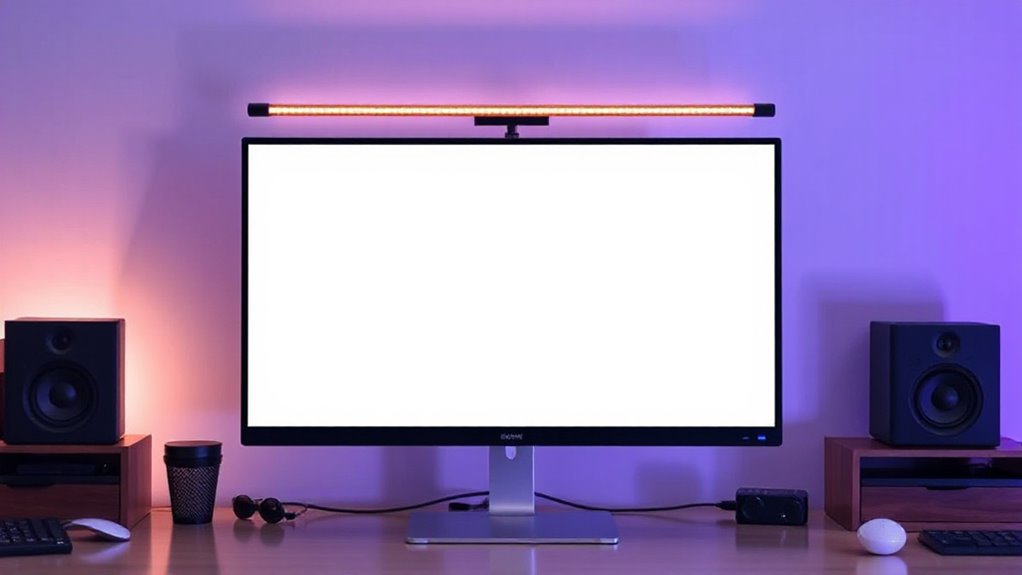
For anyone spending long hours at the computer, a monitor light bar can dramatically improve comfort and reduce eye strain. The BenQ ScreenBar Halo stands out as the best overall choice thanks to its eye-care technology and adjustable brightness. The Quntis Monitor Light Bar with Remote offers excellent versatility for those who want customizable lighting, while the YEELIGHT Monitor Light Bar provides a sleek design at a more accessible price. Buyers often face tradeoffs between features like brightness, color temperature, glare reduction, and cost. Continue reading for a detailed breakdown of the best options to help you find the perfect fit for your workspace.

Prime made for students and young adults
- Fast, free delivery for dorm and study essentials
- Prime Video and Amazon Music included
- Member-only deals
Key Takeaways
- Top picks balance brightness, glare reduction, and ease of installation to suit different workspace needs.
- Premium models like the BenQ ScreenBar Halo incorporate eye-care technology that reduces fatigue better than basic options.
- Dimmability and color temperature control are common features, but their quality varies significantly across budget and mid-range models.
- Design and compatibility are crucial—some bars work better with curved screens, others with multiple monitor setups.
- Price differentials reflect build quality, feature set, and brand reputation; choosing the right monitor light bar depends on your specific work environment.




More Details on Our Top Picks
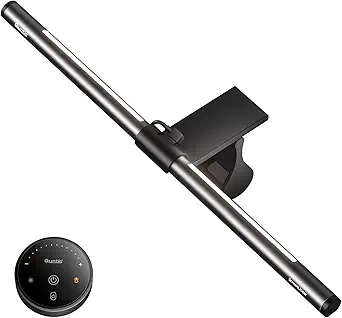
Quntis Computer Monitor Light Bar with Backlight
This option stands out for its high CRI of Ra95 and versatile lighting modes, making it ideal for reducing eye strain across work, gaming, or creative tasks. Its patented sliding clip ensures damage-free, easy installation on various monitors, while the remote offers stepless dimming and color adjustments for a personalized experience. Compared to the Xiaomi Mi Light Bar, the Quntis provides more lighting modes and a higher CRI, but its backlight brightness cannot be adjusted for color temperature, which may limit customization. The remote control requires power, adding a minor inconvenience. This light bar is best suited for users who want precise control and vivid color rendering for extended screen time.
Pros:- Glare-free, comfortable illumination reduces eye strain
- Easy, damage-free installation with sliding clip
- Remote control with stepless dimming and color temperature adjustment
- Vivid, accurate colors with high CRI
Cons:- Backlight brightness cannot be adjusted for color temperature
- Requires power source for remote control operation
Best for: Creative professionals or gamers who prioritize color accuracy and multiple lighting modes
Not ideal for: Users seeking a simple, fixed brightness solution or those who dislike remote controls that require batteries or power
- Length:16.1 inches (41 cm)
- Color:Grey
- LED Beads:84
- Color Rendering Index (CRI):Ra95
- Lighting Modes:3 (Work, Immersive, Design)
- Backlight Adjustment:Brightness only
Our verdict“This pick makes the most sense for those who want a customizable, high-accuracy monitor light that enhances visual comfort.”
Xiaomi Mi Computer Monitor Light Bar
The Xiaomi Mi Light Bar excels in saving desk space by attaching directly to your monitor’s top, making it ideal for those with limited room. Its adjustable color temperature and brightness, combined with flicker-free illumination, promote a more natural viewing experience. Compared with the Quntis Light Bar, Xiaomi’s model is less feature-rich in modes but offers a sleek, wireless remote control for easy adjustments. Its reliance on a USB Type-C port for power could be a limitation for setups without such a port. Additionally, the magnetic attachment may not fit all monitor sizes or thicknesses. This option is perfect for users wanting high color accuracy in a minimal, unobtrusive package.
Pros:- Space-saving design attaches directly to monitor
- High color accuracy with Ra95 index
- Adjustable brightness and color temperature via remote
- Flicker-free for reduced eye fatigue
Cons:- Requires USB Type-C port for power
- Limited attachment options may not fit all monitor sizes
Best for: Desk workers or students who need reliable, flicker-free lighting without clutter
Not ideal for: Users with monitors lacking a USB Type-C port or those needing extensive lighting modes
- Wireless Remote Control:Yes
- Color Rendering Index:Ra95
- Flicker-Free:Yes
- Port:USB Type-C
- Installation:Magnetic attachment
- Adjustable Features:Color temperature and brightness
Our verdict“Ideal for minimalists who want a high-accuracy light that keeps their workspace neat and free of clutter.”
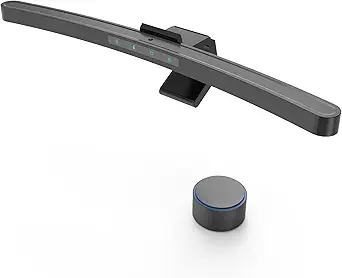
Quntis Monitor Light Bar with Remote Control, Dimmable Screen Light for Curved and Flat Monitors
This model is tailored for users with curved or ultrawide monitors, thanks to its 20.1-inch length and adjustable rotation. Its auto-dimming feature with an ambient light sensor ensures consistent brightness, making it suitable for long work or gaming sessions. Compared to the Xiaomi Light Bar, this one offers more auto-adjustment features but is less compact and portable. Its USB power requirement and remote control’s occasional responsiveness issues may be drawbacks for some. The clip and rotation adjustments make it flexible, but users with very thick monitors over 2.36 inches may find it less compatible. This is best suited for those with larger, curved screens seeking a customizable, flicker-free lighting solution.
Pros:- Adjustable brightness and color temperature via remote
- Designed to reduce glare and eye strain
- Fits most monitors with adjustable clip and rotation
- Auto-dimming with ambient light sensor
Cons:- Requires USB port for power
- Limited compatibility with very thick monitors
Best for: Gamers or professionals with curved or ultrawide monitors who want auto-dimming and flexible positioning
Not ideal for: Users with small, flat monitors or those preferring a plug-and-play solution without remote controls
- Length:20.1 inches
- Color Temperature:3000K-6500K
- CRI:95
- Power Source:USB
- Adjustable Rotation:45°
- Monitor Thickness Compatibility:0.12” to 2.36”
Our verdict“Best for users with larger, curved monitors who need auto-adjusting lighting that adapts to ambient conditions.”
16.14-inch Monitor Light Bar, 250LM USB LED Desk Lamp for Home Office and Gaming
This 16.14-inch light bar offers a straightforward, budget-conscious way to reduce glare and flicker during long hours of work or play. Its simple clip-on design makes installation quick and fuss-free, and the adjustable color temperatures (2700K to 6500K) and brightness levels help tailor lighting to your preferences. Unlike more complex models like the ONWAY, this option lacks auto-dimming or extensive modes but compensates with ease of use and affordability. Its limited thickness compatibility and fixed angle mean it’s less flexible for very thick or irregular monitors. This light bar is ideal for those who want basic, effective eye protection without extra features or high cost.
Pros:- Reduces eye strain with anti-glare, flicker-free design
- Adjustable brightness and color temperature with memory
- Easy clip-on installation and space-saving design
Cons:- Limited to screens up to 2.2 inches thick
- No adjustable angle or rotation feature
Best for: Students or casual users who need basic glare reduction and adjustable lighting on standard-sized monitors
Not ideal for: Power users or gamers who require auto-dimming or multi-mode lighting features
- Size:16.14 inches
- Brightness:250 lumens
- Color Temperatures:2700K, 4000K, 6500K
- Power Source:USB
- Installation:Clip-on
- Suitable Screen Thickness:0.12 to 2.2 inches
Our verdict“A practical, affordable choice for basic eye protection and adjustable lighting on standard monitors.”
ONWAY Curved Monitor Light Bar with Wireless Remote,Monitor Auto-Dimming and Camera Base,Applicable to All Screens. No Screen Glare,for Home Office
The ONWAY Curved Monitor Light Bar is designed for users who want a highly customizable lighting setup with additional features like RGB backlights and webcam mount compatibility. Its 8cm wireless remote allows seamless control over color temperature, brightness, and dynamic modes, making it ideal for gaming, streaming, or productivity. Compared with the Quntis Light Bar, ONWAY offers more extensive effects and a built-in memory, but its setup is more complex, and the lack of detailed specs makes it less transparent about power or compatibility. The 88 LEDs and asymmetric optical design help minimize glare, yet the multiple features might be overwhelming for simple use cases. This product is best for advanced users who need precise control, RGB effects, and multi-functionality in a monitor light.
Pros:- Stepless color and brightness adjustment via remote
- Includes RGB backlight modes and effects
- Built-in memory recalls last settings
- Flexible clamp fits most curved and flat monitors
Cons:- Complex setup with many features that might be unnecessary for simple use
- No detailed power or compatibility specs provided
Best for: Gamers, streamers, or tech-savvy users who want a feature-rich, customizable monitor light with extra functions
Not ideal for: Casual users or those seeking a straightforward, no-fuss lighting solution
Our verdict“Best suited for users who want a multi-functional, highly customizable lighting experience with ambient effects.”
BenQ ScreenBar Halo 2 LED Monitor Light Bar with Wireless Controller and Eye-Care Technology
The BenQ ScreenBar Halo 2 stands out for its exceptional glare-free illumination and high color accuracy, making it ideal for professionals who need consistent, eye-friendly lighting. Compared to the LYMAX Monitor Light Bar, it offers a more precise automatic adjustment feature and a wider color temperature range, though it comes at a higher price point. Its wireless dial with display simplifies brightness and color control, but setup can be complex, especially on curved monitors with specific thickness requirements. The Halo 2’s flicker-free, blue-light hazard-free LEDs significantly reduce eye fatigue during long work sessions, making it a top choice for office environments demanding high visual fidelity. However, casual users or those with budget constraints might find it less accessible.
Pros:- Reduces eye fatigue with glare-free, adjustable lighting
- Wireless controls enable seamless customization
- Compatible with curved monitors and space-efficient design
- High color accuracy for professional tasks
Cons:- High cost may deter casual users
- Setup process can be complex for some monitor types
Best for: Professionals and serious multitaskers who prioritize eye comfort and color accuracy
Not ideal for: Casual users or budget-conscious buyers who prefer simpler, less expensive solutions
- Backlight:Enhanced ambient backlight
- Glare Technology:Asym-Light anti-glare technology
- Control:Wireless dial with display
- Color Temperature Range:2700K – 6500K
- Monitor Compatibility:0.17″ – 2.36″ thick, 1000R – 1800R curved monitors
- Lifespan:50,000 hours
Our verdict“This pick is best suited for those who need premium, customizable eye-care lighting in a professional setting.”
Quntis Curved Monitor Light Bar 15 RGB Backlight for 34+ Screens, Computer Bar Lights Foldable Dual Light with Color Temperature Brightness Stepless Dimming, No Glare Desk Lamp for Home Office Gaming
The Quntis Curved Monitor Light Bar excels at illuminating expansive ultrawide screens over 34 inches, with flexible RGB backlighting and stepless dimming for a customized ambiance. Unlike the YEELIGHT Monitor Light Bar, it offers a foldable dual-light design, allowing users to adjust angles precisely for optimal glare reduction. Its compatibility with 800R to 3000R curvature makes it a versatile choice for gaming and professional work on large screens. The USB-powered setup limits placement options but ensures easy connectivity. Its auto-dimming sensor and memory function add convenience, although some may find the installation process slightly intricate. It’s a strong option for those with large monitors seeking immersive, customizable lighting.
Pros:- Compatible with large ultrawide curved monitors
- Adjustable RGB backlighting and color temperature
- Auto-dimming sensor and memory function
- Space-efficient clamp with stable fit
Cons:- Requires USB power, limiting placement flexibility
- Setup can be complex for some users
Best for: Gamers and professionals using large ultrawide curved monitors over 34 inches
Not ideal for: Users with small or flat monitors, or those seeking a simple, plug-and-play solution
- Length:26 inches
- Curvature Compatibility:Over 34 inches, 800R to 3000R
- Color Temperature:3000K to 6500K
- Brightness Levels:4 preset, stepless adjustment
- RGB Modes:15 modes
- Power Source:USB
Our verdict“This is ideal for users with large curved screens who want immersive, customizable backlighting for gaming or professional work.”
LYMAX Monitor Light Bar, Eye-Care USB Dimmable Screen Light with Wireless Controller
The LYMAX Monitor Light Bar offers a simple yet effective solution for reducing eye strain, with adjustable flicker-free illumination and a broad color temperature range. Compared to the BenQ Halo 2, it lacks automatic adjustments but compensates with straightforward USB operation and a space-saving clip. Its high Ra95 color rendering ensures true-to-life colors, beneficial for tasks requiring color accuracy. The wireless remote simplifies adjustments, but the requirement for a USB-C port with sufficient power may limit placement options for some setups. While it doesn’t feature advanced auto-dimming sensors, it suits users seeking affordable eye-friendly lighting without bells and whistles.
Pros:- Affordable, effective glare-free lighting
- Adjustable brightness and color temperature
- Wireless remote control for convenience
- High color accuracy for detailed work
Cons:- Requires USB-C port with adequate power
- Lacks automatic dimming and advanced features
Best for: Budget-conscious users needing effective, easy-to-install eye care lighting
Not ideal for: Power users seeking automatic or advanced lighting features, or those with limited USB-C ports
- Brightness:Up to 800 lux
- Color Temperature Range:2900K – 6000K
- Control Method:Wireless remote
- Monitor Compatibility:0.3″ – 1.1″ thick
- Water Resistance:Not water resistant
- Power Source:USB-C
Our verdict“Perfect for budget-minded individuals who want reliable, adjustable eye protection without extra complexity.”
Monitor Light Bar, Eye-Care USB Reading Desk Lamp, 11.8” LED Computer Light with Adjustable Color Temperature
The Monitor Light Bar offers a straightforward, space-efficient solution for smaller screens, with bright, even illumination that reduces eye strain. Its 11.8-inch length makes it ideal for compact setups, offering adjustable color temperature and brightness to tailor the lighting to your needs. Unlike larger, more feature-rich options like the Quntis RGB Backlight, this model focuses on simplicity and ease of use, making it a good choice for users who want quick installation without fuss. The clip-on design ensures stability without damaging the monitor surface. However, its limited coverage area may not suffice for very large screens, and it lacks advanced features like auto-dimming or remote control, which some users might miss.
Pros:- Provides bright, uniform lighting to reduce eye strain
- Easy to install with a secure clip
- Adjustable color temperature and brightness
- USB-powered for broad compatibility
Cons:- Limited coverage area for large screens
- Lacks advanced features like auto-dimming or remote control
Best for: Users with small to medium monitors seeking a simple, effective lighting upgrade
Not ideal for: Those with very large screens or needing extensive customization features
- Length:11.8 inches
- Brightness:Up to 800 lux
- Color Temperatures:3000K, 4000K, 6500K
- Power Source:USB
- Mounting:Counterweight clip
Our verdict“This light bar suits users who want a compact, easy-to-use light for small to medium monitors without extra bells and whistles.”
YEELIGHT Monitor Light Bar for Home Office and Gaming
The YEELIGHT Monitor Light Bar provides a versatile lighting solution with stepless dimming and adjustable color temperature, making it suitable for both work and gaming. Compared with the LYMAX, it offers slightly lower brightness at 250 lumens but emphasizes high color accuracy (Ra95) and a sleek design. Its easy installation and USB power make it accessible for various setups, though it lacks wireless control or auto-dimming features found in higher-end models. This light excels at reducing blue light exposure and glare, fostering healthier long-term eye habits. However, for users seeking highly automated or customizable features, this model may feel somewhat basic.
Pros:- Adjustable brightness and color temperature
- Reduces glare and blue light exposure
- High color accuracy with Ra95
- Simple, easy-to-install design
Cons:- Lower maximum brightness than some competitors
- No wireless control or auto-dimming
Best for: Home office workers and gamers who want adjustable, eye-friendly lighting on a budget
Not ideal for: Those requiring automatic brightness adjustments or advanced customization features
- Brightness:250 lumens
- Color Temperature Range:2700K to 6500K
- Color Rendering Index:Ra95
- Power Source:USB
- Material:Full-metal
Our verdict“Ideal for users seeking flexible, eye-care lighting that is easy to set up and budget-friendly.”
Quntis White Monitor Light Bar with Backlight
The Quntis White Monitor Light Bar stands out for its simple, space-saving design and intuitive remote control, making it ideal for users who want quick adjustments without fuss. Compared with the BenQ ScreenBar Pro, it offers a more affordable, minimalist option, although it lacks adjustable backlight color temperature, limiting flexibility. Its adjustable brightness and smart memory function enhance user convenience, but the backlight brightness only, and limited monitor compatibility, may hinder some setups. This makes it a good choice for those who prioritize ease of use and don’t need extensive customization.
Pros:- Reduces glare and reflections for eye comfort
- Easy to install with a sliding weighted clip
- Adjustable brightness and color temperature via remote
- Smart memory function restores last settings automatically
Cons:- Backlight brightness only, no color temperature adjustment
- Limited to monitor edges up to a certain thickness
- Requires batteries for remote, which are not included
Best for: Desk workers or gamers seeking a straightforward, space-efficient lighting solution with easy remote control
Not ideal for: Power users or professionals requiring full color temperature adjustment or more advanced features
- Length:16.1 inches (41 cm)
- Color:White
- CRI:95
- LED Beads:84
- Backlight Adjustment:Brightness only
- Remote Control:Yes
- Memory Function:Yes
Our verdict“Ideal for users who want a simple, reliable light bar with quick controls and minimal setup.”
Quntis Computer Monitor Lamp, Screen Monitor Light Bar for Eye Care, USB Reading LED Task Lamp with Auto-Dimming, Dimmable Light Bar, Touch Control, No Glare, Space Saving Home Office Desk Lamp
The Quntis Monitor Lamp offers flicker-free, blue light hazard-free illumination that significantly reduces eye strain, making it especially suitable for long hours of screen time. Its auto-dimming feature, combined with touch controls for customizable brightness and color temperature, rivals the BenQ ScreenBar Pro but with a more compact, clip-on design. Unlike the more premium model, it doesn’t feature motion sensors or ultrawide light coverage, which are better suited for those needing automatic, hands-free operation. This pick excels for users prioritizing eye comfort and space-saving design but falls short for those seeking advanced automation or extensive coverage.
Pros:- Reduces eye strain with flicker-free, blue light hazard-free lighting
- Space-saving clip-on design with no screen glare
- Auto-dimming with customizable brightness and color temperature
- High CRI LED beads for vibrant colors
Cons:- Limited waterproof features, not suitable for humid environments
- Requires USB power, possibly needing adapters
- Only compatible with monitors that can accommodate clip-on lamps
Best for: Home office workers or gamers needing flicker-free, customizable lighting with easy manual controls
Not ideal for: Users requiring motion sensors or ultrawide illumination for large or curved monitors
- Light Source:78 LED beads
- Wattage:5 watts
- Color Temperature:3000K-6500K
- Control Method:Touch
- Mounting Type:Clip On
- Power Source:USB
Our verdict“A strong choice for those seeking eye-friendly, customizable lighting without complex automation.”
BenQ ScreenBar Pro LED Monitor Light Bar (Black)
The BenQ ScreenBar Pro delivers exceptional illumination with over 1000 lux at its center, making it ideal for detailed work or long hours. Its ultrawide lighting coverage surpasses smaller models like the Quntis White, providing consistent light across large or curved monitors. The motion sensor adds a layer of convenience, automatically adjusting lighting based on presence, which is a feature not found on the other two options. However, its reliance on USB-C power and a higher price point might deter budget-conscious users. This light bar is best suited for professionals or enthusiasts who value broad, automatic lighting control and high brightness levels.
Pros:- Provides bright, ultrawide illumination to reduce eye strain
- Features motion sensor for automatic lighting control
- Adjustable brightness and color temperature for personalized lighting
- Space-saving clamp design suitable for curved monitors
Cons:- Requires USB-C power, which may not be available on all setups
- Higher price compared to basic models
- Limited waterproofing for humid environments
Best for: Professionals or serious gamers who need wide, bright, and automatic lighting for large or curved monitors
Not ideal for: Casual users or those with limited USB-C ports who prefer manual control and lower-cost solutions
- Brightness:Over 1000lx central, 500lx range
- Power:5 watts
- Light Source:LED
- Color Temperature:Adjustable
- Mounting:Clamp mount
- Dimensions:5.31″D x 19.68″W x 3.62″H
- Weight:800 g
Our verdict“Perfect for users who want a high-brightness, wide coverage light with smart automation features.”

How We Picked
These monitor light bars were selected based on key criteria including brightness levels, ease of installation, glare reduction, adjustability, and build quality. We prioritized products that offer a balance of performance and value, considering user feedback and expert insights where available. The ranking reflects how well each model caters to different needs—whether for gaming, professional work, or general use—while also factoring in price point and durability. Our goal was to highlight options that improve workspace ergonomics without adding unnecessary complexity or cost.Factors to Consider When Choosing Monitor Light Bar
Choosing the right monitor light bar involves evaluating several factors beyond basic features. The best light bar should complement your monitor size and setup, improve visual comfort, and fit your budget. Understanding these key considerations will help you avoid common pitfalls like insufficient brightness or glare, and ensure your investment enhances your workspace effectively.Brightness and Light Quality
Brightness levels are vital for effective illumination without causing glare or eye strain. Look for a model with adjustable brightness and color temperature—preferably stepless dimming—to customize lighting based on ambient conditions. High-quality LEDs provide consistent, flicker-free light that reduces fatigue over long periods. Avoid overly bright or harsh lights that can cause discomfort or make screen viewing difficult.
Compatibility and Mounting
Ensure the light bar fits your monitor size and shape. Some models are designed for curved or ultra-wide screens, while others may suit standard monitors better. Check the mounting options—clip-on, magnetic, or adhesive—to find a setup that is secure and non-damaging. Compatibility with multiple monitor setups can also influence your choice if you work across several screens.
Glare Reduction and Eye Care
Glare can negate the benefits of a light bar, so opt for models that direct light downward or have diffusers. Eye-care features like flicker-free LEDs, blue light filtering, and auto-dimming enhance comfort and reduce fatigue. If you work long hours, investing in a model with these features can make a noticeable difference in your visual well-being.
Design and Aesthetics
The appearance and size of the light bar matter if you want a seamless, professional look. Sleek, minimalist designs tend to blend into modern workspaces, while more feature-rich models may be bulkier. Consider whether the light bar complements your monitor and desk setup, and if aesthetics are a priority for your environment.
Price and Additional Features
Budget constraints influence your options, but remember that spending more often yields better build quality, longer durability, and advanced features like remote control or RGB lighting. Decide which features are must-haves versus nice-to-haves—such as auto-dimming, preset modes, or app integration—to avoid overpaying for unnecessary extras. Balance your needs against your budget for the best overall value.
Frequently Asked Questions
Will a monitor light bar reduce eye strain even if I already have good ambient lighting?
Yes, a monitor light bar can still provide targeted illumination that minimizes contrast between your screen and surrounding environment. It directs light downward, reducing glare and reflections that cause eye fatigue, even in well-lit rooms. Combining ambient lighting with a well-positioned light bar creates a balanced lighting environment that significantly eases eye strain during long work sessions.
Are RGB monitor light bars worth it if I mainly work and don’t do gaming?
RGB lighting primarily offers aesthetic customization and mood setting, which can be appealing but isn’t essential for productivity or eye comfort. If your primary goal is reducing eye fatigue and improving visibility, focus on light bars with adjustable color temperature and brightness rather than RGB features. However, if you enjoy personalized aesthetics, RGB options can add a touch of style to your workspace without compromising functionality.
Can a monitor light bar be used with curved screens or multi-monitor setups?
Many modern light bars are designed to accommodate curved screens and multi-monitor configurations. Look for models with flexible mounting options and longer or adjustable arms to ensure proper coverage. Proper placement is critical—light should illuminate your workspace evenly without causing reflections or shadows—so check the product specifications for compatibility with your specific setup.
How important is auto-dimming or ambient light sensors in a monitor light bar?
Auto-dimming or sensors that adjust based on ambient light conditions enhance comfort by maintaining consistent illumination without manual adjustments. This feature is especially useful if your lighting environment varies throughout the day or if you switch between different tasks. It helps prevent eye strain by ensuring the light level remains appropriate, which can be a valuable addition in your decision-making process.
Is it worth paying more for a monitor light bar with remote control or app integration?
Remote controls and app integration add convenience, allowing you to adjust brightness, color temperature, and modes without interrupting your workflow. These features are particularly beneficial if you frequently change lighting settings or have a multi-monitor setup. While they typically come at a higher price, the ease of use and customization can justify the expense for those prioritizing comfort and efficiency.
Conclusion
If you want the best overall performance and eye-care features, the BenQ ScreenBar Halo makes a compelling investment. For budget-conscious users who still want decent illumination, models like the YEELIGHT Monitor Light Bar offer simplicity and style at a lower price. Professionals working long hours or gamers seeking immersive lighting should consider premium options like the Quntis Curved Monitor Light Bar or BenQ ScreenBar Pro. Beginners or casual users might prefer straightforward, easy-to-install options, while those with multi-monitor setups should prioritize compatibility and adjustable arms. Ultimately, your choice depends on your specific workspace needs and budget constraints.