Digital microscopes for classrooms have one job that home hobby models don’t: keep a room full of students engaged at once. My top pick for most classrooms is the Celestron TetraView LCD Digital Microscope, because its 180° swivel screen, true compound magnification range, and sturdy metal build make it the easiest model for groups to share without crowding. If budget is the constraint, the TOMLOV DM301 Pro delivers a massive 7-inch screen that entire lab tables can see, while the Celestron LCD Digital Microscope II earns its place as the premium option for schools that want lasting optics and a rotating touchscreen. The main tradeoff in this category is between cheap handheld kid models — great for young students but weak on image quality — and full-size LCD microscopes that cost more but survive years of classroom handling. Keep reading for the full breakdown of all nine models and which one fits your grade level and budget.

Prime made for students and young adults
- Fast, free delivery for dorm and study essentials
- Prime Video and Amazon Music included
- Member-only deals
Key Takeaways
- Screen size matters more than megapixels in a classroom setting: the TOMLOV DM301 Pro’s 7-inch display let whole lab groups view specimens together, while the 2.0–2.4-inch screens on the Odatay and BMDSAE models turned viewing into a one-student-at-a-time bottleneck.
- The two Celestron models separated themselves from budget competitors through build quality — metal bodies and genuine glass optics rather than plastic housings — which matters when dozens of students handle the same unit every week.
- Handheld models (Skybasic, BMDSAE) are the wrong choice as a classroom’s only microscope but excel as low-risk second units younger students can operate independently.
- The 40X–2500X and OOZSTAR kits bundle extensive accessory sets (prepared slides, tools, storage cases) that translate into real savings for teachers building a lab from scratch.
- Mid-range LCD models like the Elikliv EDM4 hit a sweet spot of 4.3-inch display plus adjustable stand that makes them the safest default purchase for elementary and middle school science programs.
| Odatay 4K Digital Microscope for Kids, 200–1000x Magnification, 2.4-Inch Screen, 32GB Card, Blue |  | Best for Portable, Self-Contained Exploring | Magnification: 200–1000x, 4 levels | Camera: 4K HD | Screen: 2.4 inches | VIEW LATEST PRICE | See Our Full Breakdown |
| 40X–2500X Microscope with 4.3-Inch Display and 5-Megapixel Camera |  | Best for a Large Classroom Starter Kit | Magnification: Title states 40X–2500X; description lists 100x, 200x, 250x, 500x, 1000x, and 2000x | Display: 4.3-inch high-definition screen | Eyepieces: WF10x and WF16x wide-angle | VIEW LATEST PRICE | See Our Full Breakdown |
| BMDSAE 1000× Handheld Digital Microscope for Kids with 2.0-Inch IPS Screen |  | Best for Independent Beginners | Magnification: Up to 1000× | Screen: 2.0-inch IPS | Camera: 2MP | VIEW LATEST PRICE | See Our Full Breakdown |
| OOZSTAR Digital Microscope Kit with 4.3-Inch Display and 5 MP Camera | 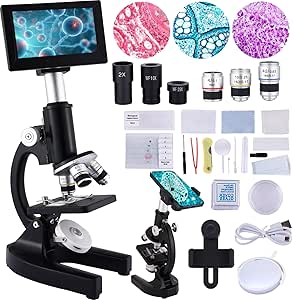 | Best for Shared Screen Viewing | Magnification: 100x, 200x, 250x, 500x, 1000x, and 2000x | Display: 4.3-inch | Camera: 5 MP | VIEW LATEST PRICE | See Our Full Breakdown |
| Skybasic Wireless Handheld Digital Microscope, 50X–1000X |  | Best for Phone-Based Exploration | Magnification: 50X–1000X | Connectivity: Wi-Fi for iOS and Android; USB for Windows and Mac | Sensor: 2 MP HD CMOS | VIEW LATEST PRICE | See Our Full Breakdown |
| Celestron LCD Digital Microscope II with 3.5-Inch Rotating Touchscreen |  | Best for Group Viewing | Screen: 3.5-inch rotating LCD touchscreen | Camera: 5MP | Video: 30 fps | VIEW LATEST PRICE | See Our Full Breakdown |
| Celestron TetraView LCD Digital Microscope with 180° Swivel Screen |  | Best Complete Classroom Kit | Camera: Built-in 5MP digital camera | Display: 4.3-inch full-color TFT LCD, 180° swivel | Magnification: 40x–1600x with digital zoom | VIEW LATEST PRICE | See Our Full Breakdown |
| Elikliv EDM4 LCD Digital Microscope, 1000x, 4.3-Inch Display |  | Best Value for Multi-Station Labs | Model: EDM4 | Display: 4.3-inch LCD | Image resolution: 720p HD | VIEW LATEST PRICE | See Our Full Breakdown |
| TOMLOV DM301 Pro Digital Microscope with 7-Inch Screen |  | Best Premium Demonstration Scope | Model: DM301 Pro | Display: 7-inch IPS screen | Magnification: Up to 1200× | VIEW LATEST PRICE | See Our Full Breakdown |
| digital microscopes for classroom | Magnification | Camera | Warranty | Included accessories |
|---|---|---|---|---|
| Odatay 4K Digital Microscope f | 200–1000x, 4 levels | 4K HD | 5 years | 12 prepared slides, data cable, lanyard, slide viewing cover, protective silicone screen case |
| 40X–2500X Microscope with 4.3- | Title states 40X–2500X; description lists 100x, 200x, 250x, 500x, 1000x, and 2000x | 5-megapixel, per title | — | Phone holder, 5 specimens, 5 slides, 100 coverslips, knife, tweezers, pipette, burette, petri dish, cotton swabs, blotting paper, microscope paper, cleaning cloth, data cable, and gauze |
| BMDSAE 1000× Handheld Digital | Up to 1000× | 2MP | 1 year | — |
| OOZSTAR Digital Microscope Kit | 100x, 200x, 250x, 500x, 1000x, and 2000x | 5 MP | — | Phone holder, 5 specimens, 5 slides, 100 coverslips, knife, tweezers, pipette, burette, petri dish, cotton swabs, blotting paper, microscope paper, cleaning cloth, data cable, and gauze |
| Skybasic Wireless Handheld Dig | 50X–1000X | — | One-year replacement service for quality problems | USB cable, bracket, base, user manual |
| Celestron LCD Digital Microsco | 40x, 100x, 400x optical; up to 1600x with digital zoom | 5MP | 2 years (US) | — |
| Celestron TetraView LCD Digita | 40x–1600x with digital zoom | Built-in 5MP digital camera | 2 years | Carrying case, 7 prepared slides, AV cable, international AC adapter, dust cover |
| Elikliv EDM4 LCD Digital Micro | Up to 1000x; varies with screen size and camera distance | — | — | — |
| TOMLOV DM301 Pro Digital Micro | Up to 1200× | 8MP | 1 year | — |
More Details on Our Top Picks
Odatay 4K Digital Microscope for Kids, 200–1000x Magnification, 2.4-Inch Screen, 32GB Card, Blue
The Odatay 4K is a practical classroom pick for short, hands-on explorations where students need to move between specimens or work outside. Its built-in 2.4-inch screen means a group can start viewing without setting up a phone or computer, and the included 32GB card lets students save images for later discussion. Compared with the larger-screen OOZSTAR Digital Microscope Kit, this model is easier to carry at 0.5 pounds, but its small display is less comfortable for a whole group to share. The 200–1000x range and adjustable LEDs offer flexibility, though the listing does not explain what each magnification level means for classroom specimens. It suits guided, portable activities better than extended class demonstrations.
Pros:- Built-in screen and included 32GB card allow viewing and saving without a separate device
- Lightweight design with lanyard and tripod hole supports portable activities
- Adjustable magnification and three LED brightness levels accommodate varied specimens
- Prepared slides and protective accessories help teachers start activities with the included kit
Cons:- The 2.4-inch screen is small for several students to view together
- The listed magnification levels are not clearly explained for classroom use
- Age recommendations vary across the listing
Best for: Teachers who want a lightweight, ready-to-use microscope for small-group specimen walks and outdoor lessons
Not ideal for: Teachers who need a large shared display for whole-class viewing or detailed group discussion
- Magnification:200–1000x, 4 levels
- Camera:4K HD
- Screen:2.4 inches
- Lighting:8 built-in LED lights; 3 brightness levels
- Storage:32GB TF card included
- Weight:0.5 lbs
- Connectivity:PC connection for file transfer
- Included accessories:12 prepared slides, data cable, lanyard, slide viewing cover, protective silicone screen case
- Warranty:5 years
Our verdict“Choose the Odatay for portable, self-contained student exploration; choose the OOZSTAR if a larger shared screen matters more.”
40X–2500X Microscope with 4.3-Inch Display and 5-Megapixel Camera
This kit puts a 4.3-inch display alongside eyepieces and a broad spread of lab accessories, giving teachers several ways to introduce specimen handling and observation. The slides, coverslips, pipette, petri dish, and other tools can support varied activities, while the phone holder provides another route for sharing what students see. Compared with the handheld BMDSAE 1000×, it is better suited to a stationary classroom station than quick individual exploration. There is a significant specification gap: the title claims 40X–2500X, while the description lists settings from 100x to 2000x. Battery type and runtime are also missing, which makes planning untethered lessons difficult. It offers a broad kit, but teachers should confirm the magnification configuration before choosing it for a specific curriculum.
Pros:- 4.3-inch display is more suitable for shared viewing than the Odatay’s 2.4-inch screen
- WF10x and WF16x eyepieces provide direct viewing options alongside the built-in camera
- Large assortment of slides, coverslips, and lab tools supports varied introductory activities
- Can run from a data cable or batteries
Cons:- Magnification claims conflict between the title and description
- Battery type and runtime are not specified
- The extensive accessory set may require teacher guidance for younger students
Best for: Teachers setting up a classroom microscope station who want a larger display and varied specimen-preparation supplies
Not ideal for: Teachers who need verified magnification settings or dependable battery planning for lessons away from outlets
- Magnification:Title states 40X–2500X; description lists 100x, 200x, 250x, 500x, 1000x, and 2000x
- Display:4.3-inch high-definition screen
- Eyepieces:WF10x and WF16x wide-angle
- Objectives:4x, 10x, and 40x achromatic
- Camera:5-megapixel, per title
- Power:Data cable or batteries
- Included accessories:Phone holder, 5 specimens, 5 slides, 100 coverslips, knife, tweezers, pipette, burette, petri dish, cotton swabs, blotting paper, microscope paper, cleaning cloth, data cable, and gauze
Our verdict“Pick this kit for a classroom station with shared viewing and lab supplies, after confirming which magnification settings the unit supports.”
BMDSAE 1000× Handheld Digital Microscope for Kids with 2.0-Inch IPS Screen
The BMDSAE 1000× keeps the controls and setup simple for students learning to focus and record observations. Its manual focus gives learners a direct role in sharpening the image, while the built-in screen and eight adjustable LEDs avoid dependence on a phone. At 2.0 inches, however, the display is even smaller than the Odatay’s 2.4-inch screen, so this is best passed between students or used individually rather than shown to a table group. The 2MP camera and limited onboard storage are enough for basic documentation, but the stated capacity of 200+ photos does not make it a strong archive for ongoing class projects. A battery life of up to two hours also calls for charging between longer sessions.
Pros:- Manual focus gives students practice adjusting the image themselves
- Built-in IPS screen and adjustable LEDs support use without a phone or computer
- Stores photos and AVI videos for basic lesson records
- USB compatibility includes Windows and Mac computers
Cons:- The 2.0-inch screen is cramped for group viewing
- Battery is listed for up to two hours, which may not cover extended activities
- Manual focusing can slow students who are new to microscope controls
Best for: Teachers introducing younger students to manual focusing and basic photo or video records in short activities
Not ideal for: Classes that need a large shared image, long sessions between charges, or substantial onboard file storage
- Magnification:Up to 1000×
- Screen:2.0-inch IPS
- Camera:2MP
- Lighting:8 adjustable LEDs; 3 brightness modes
- Battery:600mAh; up to 2 hours
- Storage:32M; supports 200+ photos or AVI videos
- Compatibility:Windows XP/Vista/7/8/10/11; Mac 11.0+
- Included items:Microscope, instruction manual, lanyard, USB-C data cable
- Warranty:1 year
Our verdict“Choose the BMDSAE for short, individual beginner activities where learning to focus matters more than a large display.”
OOZSTAR Digital Microscope Kit with 4.3-Inch Display and 5 MP Camera
For a classroom that will keep one microscope on a lab bench, the OOZSTAR’s 4.3-inch display is a more group-friendly starting point than the small screens on the Odatay and BMDSAE. Its 5 MP camera, phone holder, and cable-or-battery power give teachers options for showing and capturing observations, while the included slides, coverslips, and lab tools make it possible to plan hands-on specimen activities. The listing gives a set of magnification values, but the related title claim does not match that configuration, so I would verify the settings before building lessons around them. Battery type and runtime are absent as well. The accessory breadth favors a prepared station; for students who need a lightweight microscope they can carry, the Odatay is the more practical choice.
Pros:- 4.3-inch screen makes shared observation easier than on handheld models with smaller displays
- Built-in 5 MP camera and phone holder support capturing and showing observations
- Includes slides, coverslips, and lab tools for varied classroom activities
- Cable or battery power offers placement flexibility
Cons:- Magnification details conflict between the title and listed configurations
- Battery type and runtime are not specified
- The kit’s accessories and bench-oriented setup are less convenient for mobile activities
Best for: Teachers who want a fixed classroom station with a larger screen, camera, phone holder, and specimen-preparation supplies
Not ideal for: Teachers prioritizing portability or who need clear, verified magnification and battery details before lesson planning
- Magnification:100x, 200x, 250x, 500x, 1000x, and 2000x
- Display:4.3-inch
- Camera:5 MP
- Eyepieces:WF10x and WF16x
- Objective lenses:4x, 10x, and 40x achromatic
- Power:Data cable or batteries
- Included accessories:Phone holder, 5 specimens, 5 slides, 100 coverslips, knife, tweezers, pipette, burette, petri dish, cotton swabs, blotting paper, microscope paper, cleaning cloth, data cable, and gauze
Our verdict“Choose the OOZSTAR for a shared, stationary classroom station, provided its magnification settings match your lessons.”
Skybasic Wireless Handheld Digital Microscope, 50X–1000X
The Skybasic Wireless Handheld makes the most sense when students already have access to compatible phones or computers and the lesson centers on casual inspection. Wi-Fi pairing with iOS and Android lets a teacher display or save views through a phone, while USB support extends use to Windows and Mac. Unlike the BMDSAE, it has no built-in screen, so classroom use depends on a separate device and successful connection. Its fixed-focus design and 2 MP sensor suit surface details and informal exploration, but the listing specifically says it is not intended for professional biological study. The Odatay is a better fit when a self-contained screen and included prepared slides matter; Skybasic is the more flexible option for device-based sharing, with the tradeoff of extra setup and a missing USB adapter.
Pros:- Connects over Wi-Fi to iOS and Android devices and by USB to Windows and Mac
- Eight adjustable LEDs help adapt illumination to different surfaces
- Supports photo and video capture through compatible devices
- Portable format suits casual indoor and outdoor observation
Cons:- Fixed-focus design is not suited to professional biological study
- No built-in display means a phone or computer is needed for viewing
- USB adapter is not included, and photo and function keys work only over Wi-Fi
Best for: Teachers running casual, device-based exploration with students who can connect compatible phones or classroom computers
Not ideal for: Biology classes requiring controlled specimen focus, standalone viewing, or a USB adapter in the box
- Magnification:50X–1000X
- Connectivity:Wi-Fi for iOS and Android; USB for Windows and Mac
- Sensor:2 MP HD CMOS
- Image resolution:Up to 1920 × 1080 on smartphones; 720P on computers
- LED lights:8 adjustable
- Focal length range:3–60 mm
- Included accessories:USB cable, bracket, base, user manual
- Warranty:One-year replacement service for quality problems
Our verdict“Choose Skybasic for casual lessons built around student devices; choose the Odatay when a standalone screen is more useful.”
Celestron LCD Digital Microscope II with 3.5-Inch Rotating Touchscreen
What sets the Celestron LCD Digital Microscope II apart from similarly priced classroom scopes is its rotating 3.5-inch touchscreen — a small detail that changes how a lab period actually runs. Instead of students crowding behind an eyepiece, a teacher can swivel the display toward a small group and walk them through the same specimen at 40x, 100x, or 400x optical magnification. The mechanical stage is something budget handhelds like the BMDSAE 1000× lack entirely, and it makes precise slide navigation far easier for beginners. The 5MP camera records 30 fps video straight to the included 2 GB SD card, so documenting a lesson takes seconds. The tradeoff: the 1600x figure leans on digital zoom, so image quality softens at the top end, and AA batteries ship separately.
Pros:- Rotating screen lets small groups share a live view without an eyepiece
- Mechanical stage and dual adjustable LEDs make slide work manageable for students
- Records 30 fps stills and video directly to the included 2 GB SD card
- Runs on AC adapter or batteries for flexible lab placement
Cons:- Requires four AA batteries that aren’t included
- Maximum magnification relies on digital zoom, which degrades image detail
Best for: Middle and high school science teachers who need multiple students viewing and recording specimens at once
Not ideal for: Districts needing true high-magnification optical performance for advanced biology — digital zoom past 400x won’t hold up
- Screen:3.5-inch rotating LCD touchscreen
- Camera:5MP
- Video:30 fps
- Magnification:40x, 100x, 400x optical; up to 1600x with digital zoom
- Objective lenses:4x, 10x, and 40x
- Illumination:Adjustable top and bottom LED lights
- Storage:2 GB SD card included
- Power:4 AA batteries (not included) or included AC adapter
- Warranty:2 years (US)
Our verdict“This is the pick for classrooms where shared viewing and easy documentation matter more than peak magnification.”
Celestron TetraView LCD Digital Microscope with 180° Swivel Screen
The Celestron TetraView wins on readiness. Where most competitors — including the Elikliv EDM4 and the OOZSTAR kit — make you buy storage separately, this scope arrives with a 2GB microSD card, seven prepared slides, a canvas carrying case, and an international AC adapter. For a teacher unboxing it the night before class, that difference is the whole story. Its 4.3-inch 180° swivel screen is slightly larger and more flexible than the screen on the Celestron LCD II, though its video capture tops out at 20 fps rather than 30, so motion-heavy footage looks slightly choppier. The 40x–1600x range covers everything from insect wings to plant cells, and Celestron’s two-year warranty with technical support is a real advantage for schools that need long-term reliability rather than disposable hardware.
Pros:- Ships as a complete kit with prepared slides, microSD card, case, and AC adapter
- 180° swivel screen adapts to different desk and seating arrangements
- Wide 40x–1600x magnification range handles both macro and cellular specimens
- Two-year warranty with technical support adds institutional peace of mind
Cons:- Video recording limited to 20 fps, behind the Celestron LCD II’s 30 fps
- Maximum magnification depends on digital zoom rather than pure optics
Best for: Schools buying their first digital microscope that want everything — slides, storage, case, and adapter — in one box
Not ideal for: Buyers who prioritize smooth video recording, since 20 fps footage is noticeably less fluid than 30 fps rivals
- Camera:Built-in 5MP digital camera
- Display:4.3-inch full-color TFT LCD, 180° swivel
- Magnification:40x–1600x with digital zoom
- Video:20 fps SD video
- Storage:2GB microSD card (over 1,200 high-resolution images)
- Included accessories:Carrying case, 7 prepared slides, AV cable, international AC adapter, dust cover
- Warranty:2 years
Our verdict“The TetraView makes the most sense for classrooms that want a turnkey setup with accessories and warranty coverage rather than a bare scope.”
Elikliv EDM4 LCD Digital Microscope, 1000x, 4.3-Inch Display
When a department needs several microscopes on a tight budget, the Elikliv EDM4 is the pragmatic choice. Unlike the BMDSAE handheld with its tiny 2.0-inch screen, this model gives students a proper 4.3-inch 720p display and a height-adjustable stand, so it functions like a real bench instrument rather than a toy. Its rechargeable battery running up to 3 hours also frees it from wall outlets — something neither Celestron model can do — making it easy to shuffle between lab tables. Eight adjustable LEDs handle lighting for everything from coins to slides. The compromises are real, though: you’ll need to add a memory card before capturing anything, and its magnification claims depend on screen size and viewing distance, so it’s better suited to inspection-style work than rigorous cell biology alongside the Celestron TetraView.
Pros:- 4.3-inch built-in display means no computer needed at each station
- Rechargeable battery delivers up to 3 hours of cordless use
- Connects to both Windows and Mac computers for larger-screen viewing
- Height-adjustable stand and 8 adjustable LEDs support hands-on student work
Cons:- Memory card sold separately, so photo capture isn’t possible out of the box
- Magnification is distance- and screen-dependent, making precise measurement unreliable
Best for: Science departments equipping multiple student stations cheaply, or teachers who need cordless portability between rooms
Not ideal for: Biology lessons requiring consistent, calibrated magnification — actual power varies with distance and screen size
- Model:EDM4
- Display:4.3-inch LCD
- Image resolution:720p HD
- Magnification:Up to 1000x; varies with screen size and camera distance
- Lighting:8 adjustable LED lights
- Compatibility:Windows and MacBook
- Battery life:Up to 3 hours
- Stand:Height-adjustable
Our verdict“This model fits budget-strapped classrooms that need functional, portable scopes in quantity rather than one polished unit.”
TOMLOV DM301 Pro Digital Microscope with 7-Inch Screen
If one microscope will anchor a classroom’s demonstrations, the TOMLOV DM301 Pro earns the premium slot on screen size alone. Its 7-inch IPS display dwarfs the 4.3-inch panels on the Celestron TetraView and Elikliv EDM4, meaning students at the back of a demo table can actually see what’s under the lens. The 8MP camera with 1080p video outclasses every other scope in this lineup, and its wireless app support plus TV output lets a teacher mirror the view to a projector for the entire class — a genuinely different teaching mode. The bundled ten slides, microSD card, and carrying case mirror the TetraView’s kit approach. The weak point is battery life capped at 3 hours, so full-day use means keeping the power adapter handy, and the one-year warranty is shorter than Celestron’s two.
Pros:- 7-inch IPS screen is the largest in this lineup and visible across a demo table
- Wi-Fi app plus TV and computer output enables whole-class projection
- 8MP photos and 1080p video exceed the capture quality of 5MP rivals
- Includes microSD card, 10 slides, carrying case, and full cable set
Cons:- Battery life tops out at 3 hours, requiring the adapter for full school days
- Only a one-year warranty, half the coverage of the Celestron models
Best for: Teachers who present to the whole class and want the largest built-in screen plus projector and TV output
Not ideal for: All-day mobile use or schools prioritizing long warranty coverage — the 3-hour battery and 1-year warranty are limiting
- Model:DM301 Pro
- Display:7-inch IPS screen
- Magnification:Up to 1200×
- Camera:8MP
- Video:1080p
- Connectivity:Wi-Fi app support; USB and HD output
- Lighting:Adjustable top and bottom LEDs
- Battery life:Up to 3 hours
- Warranty:1 year
Our verdict“For a front-of-room demonstration microscope that the whole class can see at once, this is the strongest option in the roundup.”

How We Picked
I evaluated each microscope against the realities of a classroom rather than a hobbyist’s desk. The criteria that drove the ranking were shared-viewing capability (screen size and angle adjustability), durability under daily student handling, ease of operation for the intended age group, image clarity at educationally relevant magnifications, and value per dollar for bulk or departmental purchasing. A microscope that produces beautiful images but breaks the first time a seventh-grader drops it ranks below a sturdier model with humbler specs.
That logic explains the ordering. The Celestron TetraView and LCD II earn the top spots because their metal construction, rotating screens, and true compound optics handle group demonstrations and years of abuse. The TOMLOV and Elikliv follow as best-value LCD models that cover the core classroom needs at lower cost. The 40X–2500X and OOZSTAR kits rank mid-table on bundled accessories, while the handheld Odatay, BMDSAE, and Skybasic models fill specific niches — younger grades, portability, tight budgets — rather than competing as all-around classroom tools.
Factors to Consider When Choosing Digital Microscopes For Classrooms
Before choosing a digital microscope for a classroom, it helps to step back from individual products and think about how the tool will actually be used day to day. Below are the factors that most often make or break a classroom purchase.Who Will Actually Be Looking Through It?
The single biggest mistake schools make is buying one microscope and expecting it to serve every purpose. A whole-class demonstration tool needs a large, angled screen that a huddle of students can see at once, which pushes you toward 4.3-inch LCD models or larger. A station-based lab where students rotate in pairs can work with smaller handheld units because only one or two kids view at a time. Ask yourself whether the teacher will drive the lesson from one unit or whether students will operate microscopes themselves — the answer changes which screen size and durability level make sense. Buying a 2-inch handheld for demonstration purposes is a common and expensive mismatch.
Durability Is a Spec, Not a Bonus
Classroom microscopes get dropped, knocked off desks, carried by the strap, and left on overnight. Models with metal bodies and glass optics — like the Celestron line — cost more upfront but routinely outlast plastic-bodied alternatives by years. Check whether the stage, focus knob, and stand feel like they tolerate rough adjustment, because those are the parts students touch most. Also consider whether replacement parts (slides, stages,illumination bulbs or LED modules) are available, since a broken focus assembly on a no-name brand usually means replacing the whole unit. For departments buying multiple units, a slightly pricier durable model often costs less per year of service than a cheaper one replaced annually.
Magnification Numbers Can Be Misleading
A “1000x” claim on a $30 handheld microscope does not mean the same thing as 1000x on a compound microscope with interchangeable objectives. Handheld models typically use digital zoom, which enlarges the image but degrades detail, while true compound scopes use optical objectives that genuinely resolve finer structures. For elementary lessons on leaves, fibers, and crystals, digital zoom is usually fine. For middle and high school biology — cell structures, protozoa, prepared tissue slides — optical magnification with proper illumination is what produces a clear image. Match the magnification type to the curriculum, not the biggest number on the box.
Software, Storage, and Sharing
Classroom value often hides in how images get off the microscope. Models with microSD slots, USB connectivity, or wireless transmission to a projector let teachers capture student findings for reports, share live views on a big screen, or build a slide library over time. Check whether the included software works with your school’s devices and operating system — some budget models only support older Windows versions, which is a real problem in Chromebook districts. Wireless handheld units like the Skybasic can stream to a classroom display, effectively turning a cheap unit into a whole-class teaching tool. Factor these workflow features in before purchase, because retrofitting sharing capability later is rarely possible.
Bundled Accessories vs. Buying Separately
Kits that include prepared slides, blank slides, tweezers, and storage cases can save a surprising amount when you are outfitting a science program from nothing. The 40X–2500X and OOZSTAR kits stood out here for the sheer completeness of their bundles. That said, don’t let a large accessory count justify a mediocre microscope body — accessories are cheap to buy separately, but a blurry image can’t be fixed. Compare what the bundle actually contains against what your curriculum requires, and remember that consumables like slides get used up and need replenishing regardless of which microscope you choose.
Matching the Purchase to Your Grade Level
Elementary classrooms generally benefit from simple, forgiving, handheld-friendly models with big buttons and immediate on-screen results, even if the optics are modest — the goal at that age is engagement, not laboratory precision. Middle school programs need adjustable stands, decent illumination, and enough magnification to support real biology units, which points toward mid-range LCD models. High school labs demand true compound optics and higher optical magnification, making premium models like the Celestron TetraView the appropriate investment. If a school buys one unit to span multiple grades, a swivel-screen LCD model is the safest compromise because it adapts to both demonstration and station use.
Frequently Asked Questions
What magnification do students actually need for school biology lessons?
For most elementary and middle school lessons — examining insects, leaves, fabrics, salt crystals, and simple prepared slides — magnification between 40x and 400x covers nearly everything on the syllabus. Claims of 1000x or more matter mainly for high school biology, where students need to resolve cell structures and microorganisms, and even then optical magnification is what counts, not digital zoom. A model with clear 400x optical performance will teach better lessons than a blurry “1000x” handheld. When comparing models, look at whether the magnification comes from real objectives or digital enlargement, and prioritize image sharpness over the largest printed number. Teachers consistently get more educational value from a crisp 200x image than a washed-out 1000x one.
Are cheap handheld digital microscopes good enough for a classroom, or should we spend more on an LCD model?
Handheld models work well as supplemental units, especially for younger students who benefit from pointing a device at anything and seeing instant results — there is real value in that simplicity and low breakage risk. The problem comes when a handheld is the classroom’s only microscope, because small screens create bottlenecks, digital zoom degrades detail, and there’s no stable stage for prepared slides. A reasonable approach for tight budgets is one mid-range LCD model for demonstrations and lab work, plus one or two handhelds for exploration stations. If the choice is strictly one unit, spend the extra money on an LCD model with a stand; the shared-viewing benefit pays off every single lesson. The exception is early elementary classrooms, where a durable handheld may genuinely be the better primary tool.
Can a digital microscope connect to a projector or classroom display for whole-class teaching?
Many can, and this capability changes how a lesson runs. Wireless handheld models like the Skybasic stream live video to laptops, tablets, or phones, which a teacher can then mirror to a projector — turning an inexpensive unit into a whole-class demonstration tool. Wired LCD models vary: some output over HDMI or USB to an external screen, while cheaper ones confine viewing to their built-in display. Before purchasing, check the output options and confirm compatibility with your school’s devices, since some budget models only ship with software for older Windows versions and won’t work with Chromebooks. If whole-class projection is central to your teaching style, treat connectivity as a deciding feature rather than a nice extra.
How many digital microscopes should a classroom realistically buy?
A practical starting formula is one demonstration-quality LCD unit for the teacher plus one additional microscope for every three to four students, given typical lab group sizes. That means a class of 24 working in groups of four needs roughly six student-accessible units, which is where durable budget models like the Elikliv EDM4 or bundled kits make sense as the workhorses. Concentrating the budget on one premium unit and filling the rest with cheap handhelds creates uneven lab experiences, so aim for consistency at the student level. Also budget for consumables — slides, cover slips, and staining kits — since running out of those stalls lessons as surely as having too few microscopes. Departments that buy incrementally over two or three budget cycles usually end up with a better balanced set than those spending everything at once.
What maintenance do classroom digital microscopes need to stay usable?
Plan for three recurring tasks: lens cleaning, illumination checks, and cable or battery management. Lenses and screens accumulate fingerprints quickly with student use, so keep microfiber cloths and lens-safe cleaning fluid stocked, and teach a basic cleaning routine as part of lab procedure. LED illumination is long-lasting on most modern models, but batteries in handheld units drain fast with daily use, so rechargeable sets or a charging station prevent dead microscopes mid-lesson. Store units in cases or a locked cabinet between classes — most classroom microscope damage happens during informal handling, not during lessons. Finally, assign one student per group responsibility for setup and return, which cuts loss of slides and accessories dramatically over a school year.
Conclusion
The right pick depends on who is using it and how often. For the best overall classroom microscope, the Celestron TetraView stands out with its swivel screen, compound optics, and build quality that survives years of student handling. The best value goes to the Elikliv EDM4, which covers the core needs of a middle school science program at a fraction of the premium price, with the TOMLOV DM301 Pro as the alternative pick if a 7-inch shared screen is the priority. For premium buyers — high school labs and districts purchasing for the long term — the Celestron LCD Digital Microscope II justifies its cost through optics and durability. The 40X–2500X kit and OOZSTAR kit make the most sense for teachers building a complete lab on a budget, thanks to their bundled slides and accessories. For younger students and beginners, the BMDSAE handheld and Odatay 4K offer the simplicity and low-stakes operation early elementary classrooms need, while the Skybasic wireless fills the specific niche of projecting live views to a classroom display. Match the model to your grade level and budget, and you’ll get a tool that earns its place in the lesson plan every week.
Fall Picks
fall essentials
As an affiliate, we earn on qualifying purchases.