
Educational coding toys for kids range from simple screen-free command games to robots children can program and build. Botley 2.0 is my best overall pick for its screen-free introduction to sequencing, while mBot suits older kids ready for more hands-on robotics and Tale-Bot Pro offers a gentle starting point for preschoolers. The main tradeoff is between easy, immediate play and toys with deeper coding or building that may need more adult support. Age labels matter, but so do a child’s patience, reading ability, and interest in open-ended projects. Read on for how the 15 options compare and which type of learner each one suits.

Prime made for students and young adults
- Fast, free delivery for dorm and study essentials
- Prime Video and Amazon Music included
- Member-only deals
Key Takeaways
- Botley 2.0 is the strongest all-around screen-free choice; it offers a broader starting point than the simpler Code & Go Robot Mouse toys.
- mBot and Mech-5 are better matches for older children who want construction and robot behavior, not just command sequencing.
- Tale-Bot Pro and Switcheroo Coding Crew are designed around younger learners, so they make more sense as first coding experiences than programming kits.
- Several products share a family resemblance: the Code & Go Mouse, Botley, Botley 2.0, and Botley 2.0 Activity Set differ in scope and included activities, so buyers should compare the exact bundle.
- Screen-free play is not the only measure of learning value; a screen-based or buildable robot can support deeper experimentation if the child is ready for the setup and guidance.
| Learning Resources Code & Go Robot Mouse Activity Set | 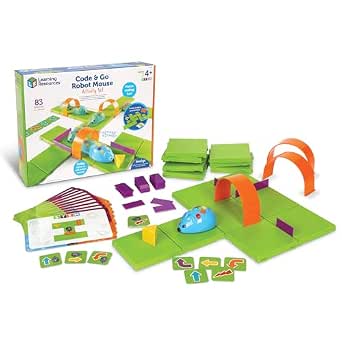 | Best for First-Time Coders | Brand: Learning Resources | Recommended age: 4 years and up | Included components: 83 pieces: robot mouse, 16 maze grids, 22 maze walls, 3 tunnels, 30 double-sided coding cards, 10 double-sided activity cards, cheese wedge, and Activity Guide | VIEW LATEST PRICE | See Our Full Breakdown |
| Learning Resources Botley the Coding Robot |  | Best for Building Early Coding Logic | Brand: Learning Resources | Model: LER2936 | Recommended age: 5–8 years | VIEW LATEST PRICE | See Our Full Breakdown |
| Makeblock mBot STEM Coding Robot Kit for Kids Ages 8–12 | 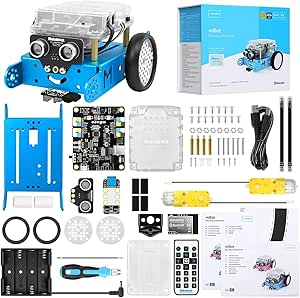 | Best for Older Kids Ready to Build | Brand: Makeblock | Model: 90053 | Recommended age: 8 years and up | VIEW LATEST PRICE | See Our Full Breakdown |
| Learning Resources Botley 2.0 Coding Robot |  | Best for Varied Screen-Free Challenges | Brand: Learning Resources | Model: LER2941 | Recommended age: 5–8 years | VIEW LATEST PRICE | See Our Full Breakdown |
| Learning Resources Switcheroo Coding Crew |  | Best for Imaginative Preschool Play | Brand: Learning Resources | Model: LER3108 | Recommended age: 4–6 years | VIEW LATEST PRICE | See Our Full Breakdown |
| Educational Insights PYXEL Coding Robot for Kids |  | Best for Building Toward Python | Brand: Educational Insights | Model: PYXEL Coding Pet | Model number: 1130 | VIEW LATEST PRICE | See Our Full Breakdown |
| Learning Resources STEM Explorers Pixel Art Challenge |  | Best Screen-Free Coding Concepts for Early Learners | Brand: Learning Resources | Recommended age: 5–8 years | Challenge count: 40 | VIEW LATEST PRICE | See Our Full Breakdown |
| Learning Resources Botley 2.0 Coding Robot Activity Set |  | Best for Screen-Free Route Programming | Brand: Learning Resources | Model: LER2938 | Recommended age: 5–10 years | VIEW LATEST PRICE | See Our Full Breakdown |
| Thames & Kosmos My Robotic Pet: Coding Chameleon |  | Best Build-and-Code Project | Brand: Thames & Kosmos | Model: My Robotic Pet: Coding Chameleon | Model number: 620507 | VIEW LATEST PRICE | See Our Full Breakdown |
| Learning Resources Coding Critters Ranger & Zip 22-Piece Screen-Free Coding Toy |  | Best for Story-Led First Coding Play | Brand: Learning Resources | Recommended age: 4–10 years | Number of pieces: 22 | VIEW LATEST PRICE | See Our Full Breakdown |
| Learning Resources Code & Go Robot Mouse |  | Best for First Coding Steps | Brand: Learning Resources | Model: LER2841 | Recommended age: 4–7 years | VIEW LATEST PRICE | See Our Full Breakdown |
| Playz My First Coding & Computer Science Kit for Kids |  | Best for Offline Coding Concepts | Brand: Playz | Age range: 6 years and up | Kit name: My First Coding & Computer Science Kit | VIEW LATEST PRICE | See Our Full Breakdown |
| MatataStudio Tale-Bot Pro Screen-Free Coding Robot for Kids Ages 3–5 | 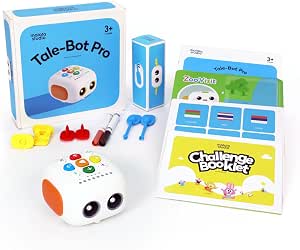 | Best for Preschool Storytelling | Brand: MatataStudio | Recommended age: 3–5 years | Control type: Button-based, screen-free | VIEW LATEST PRICE | See Our Full Breakdown |
| Mech-5 STEM Coding Robot Building Kit for Kids Ages 10+ |  | Best for Mechanical Engineering | Brand: Teach Tech | Age range: 10+ years | Model number: TTC-895 | VIEW LATEST PRICE | See Our Full Breakdown |
| Apitor Robot Wheels Coding Robot for Kids Ages 5–8 |  | Best for a Screen-Free-to-App Progression | Brand: Apitor | Model: APR011 | Recommended age: 5–8 years | VIEW LATEST PRICE | See Our Full Breakdown |
| educational coding toys for kid | Brand | Recommended age | Included components | Model |
|---|---|---|---|---|
| Learning Resources Code & Go R | Learning Resources | 4 years and up | 83 pieces: robot mouse, 16 maze grids, 22 maze walls, 3 tunnels, 30 double-sided coding cards, 10 double-sided activity cards, cheese wedge, and Activity Guide | — |
| Learning Resources Botley the | Learning Resources | 5–8 years | Botley robot, remote programmer, detachable arms, coding cards, tiles, and obstacles | LER2936 |
| Makeblock mBot STEM Coding Rob | Makeblock | 8 years and up | — | 90053 |
| Learning Resources Botley 2.0 | Learning Resources | 5–8 years | Robot, remote, cards, tiles, obstacle pieces, snap-on arms, and themed add-ons | LER2941 |
| Learning Resources Switcheroo | Learning Resources | 4–6 years | Robot hub, 3 character shells, 9 puzzle cards, and 15 math and coding challenge cards | LER3108 |
| Educational Insights PYXEL Cod | Educational Insights | 8–14 years | Coding pet, USB-C cord, Code Activator, guide | PYXEL Coding Pet |
| Learning Resources STEM Explor | Learning Resources | 5–8 years | Foam pixel pieces, display tray, challenge booklet | — |
| Learning Resources Botley 2.0 | Learning Resources | 5–10 years | Coding robot, remote programmer, 40 coding cards, 6 double-sided boards, stackable obstacle pieces | LER2938 |
| Thames & Kosmos My Robotic Pet | Thames & Kosmos | 8–12 years; adult help recommended for ages 8+ | — | My Robotic Pet: Coding Chameleon |
| Learning Resources Coding Crit | Learning Resources | 4–10 years | — | — |
| Learning Resources Code & Go R | Learning Resources | 4–7 years | Programmable robot mouse, 30 double-sided coding cards, Activity Guide | LER2841 |
| Playz My First Coding & Comput | Playz | — | 30+ tools, ingredients, and parts | — |
| MatataStudio Tale-Bot Pro Scre | MatataStudio | 3–5 years | Tale-Bot Pro robot, double-sided interactive map, challenge booklet with 14 missions, configuration card, 2 washable markers | — |
| Mech-5 STEM Coding Robot Build | Teach Tech | — | Assembly parts, English instruction manual | — |
| Apitor Robot Wheels Coding Rob | Apitor | 5–8 years | Robot Wheels, 48 coding cards, space map, 12 activity cards, guide card, user guide | APR011 |
More Details on Our Top Picks
Learning Resources Code & Go Robot Mouse Activity Set
Colby the mouse makes early coding tangible: children arrange maze pieces, plan a route with coding cards, then enter commands using the robot’s buttons. That hands-on sequence suits younger beginners who are not ready for an app or an open-ended programming interface. Compared with Switcheroo Coding Crew, this set puts more emphasis on building and solving mazes than on character-driven rescue play; Botley, by contrast, offers more advanced logic features for children starting around age five. The 83-piece set gives families room to vary the maze and repeat challenges, though the 20-by-20-inch board needs a clear play surface. It is a focused introduction rather than a long-term robotics platform, and the three AAA batteries are not included.
Pros:- Button commands and coding cards make sequencing visible and approachable for beginners.
- Maze walls, grids, tunnels, and activity cards support varied repeat challenges.
- Screen-free play practices logic and problem-solving through physical trial and adjustment.
- Two speeds, lights, and sounds add feedback without requiring a screen.
Cons:- The 20-by-20-inch maze board needs a sizable clear play area.
- Three AAA batteries are required and are not included.
- Its maze-based activities offer less programming depth than Botley’s loops and if/then logic.
Best for: Families with children age four and up who want a screen-free first coding toy built around physical mazes and guided challenges.
Not ideal for: Buyers seeking programmable loops, more advanced logic, or a robot that grows into app-based coding; Botley or mBot offers a more advanced path.
- Brand:Learning Resources
- Recommended age:4 years and up
- Included components:83 pieces: robot mouse, 16 maze grids, 22 maze walls, 3 tunnels, 30 double-sided coding cards, 10 double-sided activity cards, cheese wedge, and Activity Guide
- Maze board size:20 x 20 inches
- Robot features:Lights, sounds, and two speeds
- Power:3 AAA batteries, not included
- Model number:LER2831
Our verdict“Choose this set for a young beginner who will enjoy planning and rerouting Colby through hands-on mazes.”
Learning Resources Botley the Coding Robot
Botley is the strongest fit here for children ready to move beyond basic directional commands. Its remote programmer can send up to 80 steps, and the robot supports loops and if/then logic, giving kids a way to explore how a program can repeat or respond to a condition. Compared with the Code & Go Robot Mouse, Botley is less about constructing a maze and more about writing a sequence for obstacle courses, line-following, and other challenges. That added logic makes it a better choice for a five-to-eight-year-old ready for more complexity, while Botley 2.0 offers multiple coding modes and light effects in a later model. The tradeoff is a less beginner-focused experience for younger children, and the listed set has no manufacturer warranty.
Pros:- Supports sequences of up to 80 programmed steps.
- Loops and if/then logic introduce concepts beyond basic directional commands.
- Obstacle-course pieces and line-following enable varied hands-on challenges.
- Screen-free remote programming avoids an app or tablet requirement.
Cons:- Its age range and expanded logic may be too challenging for younger preschoolers.
- The product listing specifies no manufacturer warranty.
- Compared with the 83-piece Code & Go set, it includes fewer pieces for building maze layouts.
Best for: Parents and educators of children ages five to eight who want a screen-free robot that can introduce sequences, loops, and conditional logic.
Not ideal for: Families shopping for a child under five or for the simplest first coding activity; the Code & Go Robot Mouse is aimed at younger beginners.
- Brand:Learning Resources
- Model:LER2936
- Recommended age:5–8 years
- Programmable steps:Up to 80
- Included components:Botley robot, remote programmer, detachable arms, coding cards, tiles, and obstacles
- Set size:45 pieces
- Screen-free:Yes
- Warranty:No manufacturer warranty listed
Our verdict“Pick Botley for a screen-free learner ready to practice longer programs, loops, and conditional logic.”
Makeblock mBot STEM Coding Robot Kit for Kids Ages 8–12
mBot is the most hands-on robotics option in this group: children assemble the robot, then explore coding alongside electronics through Scratch, Arduino, and mBlock. That makes it a better match for older kids who want to see how a robot is put together, not just send commands to a ready-made toy. Compared with Botley, which keeps programming screen-free and centers on obstacle courses and logic, mBot introduces software-based programming and a broader hardware ecosystem. Its line-following and obstacle-avoidance functions give projects a practical payoff, while compatibility with more than 100 electronic modules and 500 platform parts leaves room to expand. The tradeoff is a steeper age and setup threshold: the listed kit requires batteries that are not included, and some coding use depends on compatible devices and software.
Pros:- Connects robot assembly with programming, electronics, and robotics concepts.
- Supports Scratch, Arduino, and mBlock rather than relying on a single coding path.
- Line following and obstacle avoidance give coding projects visible real-world behavior.
- Compatibility with a wide range of Makeblock modules and parts supports expansion.
Cons:- The recommended age of eight and up makes it a less suitable first coding toy for younger children.
- Four AA robot batteries and one CR2025 remote battery are not included.
- Compared with the screen-free Botley, its software-based programming may require more setup and compatible devices.
Best for: Families with children eight and up who want a buildable robot that connects coding to electronics and can support later projects.
Not ideal for: Buyers seeking a simple, screen-free toy for preschoolers or early elementary beginners; Code & Go Robot Mouse and Botley are more accessible starting points.
- Brand:Makeblock
- Model:90053
- Recommended age:8 years and up
- Programming platforms:Scratch, Arduino, and mBlock
- Robot functions:Remote control, line following, and obstacle avoidance
- Assembly time:About 15 minutes
- Robot power:4 AA batteries, not included
- Remote controller power:1 CR2025 battery, not included
- Compatibility:100+ electronic modules and 500+ Makeblock platform parts
Our verdict“Choose mBot for an older child who wants to build a robot and grow from introductory coding into electronics projects.”
Learning Resources Botley 2.0 Coding Robot
Botley 2.0 suits children who have outgrown a single style of coding activity but still benefit from screen-free play. Multiple coding modes, obstacle detection, and black-line following let families vary the task without moving to an app. Compared with the original Botley, this version adds light-up effects and themed accessories, giving imaginative play a stronger role alongside programming. It also offers a distinct middle ground between the maze-first Code & Go Robot Mouse and the more software-oriented Makeblock mBot. The 46-piece set includes a remote, cards, tiles, obstacles, snap-on arms, and themed add-ons, but its broader play package comes with a battery setup to plan for: five AAA batteries are needed, none are included, and installation requires a Phillips screwdriver. No manufacturer warranty is listed.
Pros:- Multiple coding modes help vary screen-free challenges as a child gains confidence.
- Obstacle detection and black-line following provide different ways to test commands.
- The 46-piece set combines coding materials with themed accessories for imaginative play.
- Light-up effects add feedback without introducing an app or screen.
Cons:- Requires five AAA batteries, which are not included.
- A Phillips screwdriver is needed to install the batteries.
- No manufacturer warranty is listed, unlike what some buyers may expect from a more feature-rich set.
Best for: Families with children ages five to eight who want multiple screen-free activity styles, including line-following and obstacle challenges.
Not ideal for: Buyers who want a toy with included batteries, the simplest possible setup, or an explicit manufacturer warranty.
- Brand:Learning Resources
- Model:LER2941
- Recommended age:5–8 years
- Set size:46 pieces
- Coding modes:Multiple
- Features:Obstacle detection, black-line following, and light-up effects
- Included components:Robot, remote, cards, tiles, obstacle pieces, snap-on arms, and themed add-ons
- Batteries:5 AAA batteries total: 3 for the robot and 2 for the remote; not included
- Warranty:No manufacturer warranty listed
Our verdict“Choose Botley 2.0 for a young learner who wants varied screen-free coding challenges and can handle the battery setup.”
Learning Resources Switcheroo Coding Crew
Switcheroo Coding Crew makes the story the entry point: children use push-button commands to guide a robot through rescue missions, supported by three vehicle shells and challenge cards. That character-led format makes it a strong preschool alternative to the more maze-centered Code & Go Robot Mouse, while Botley is the better fit for children ready for longer programs and more advanced logic. With Code Mode and Play Mode, the set separates command-based challenges from lights, sounds, and vehicle-specific play, so coding is not the only reason to return to it. The included puzzle and challenge cards also give adults a starting point for guided play. Its narrow four-to-six age range can limit its staying power, however, and AAA batteries are not included; the set also has no manufacturer warranty listed.
Pros:- Push-button commands introduce sequencing without a screen or app.
- Three vehicle shells encourage imaginative rescue-mission play.
- Challenge and puzzle cards provide structured activities for adult-guided learning.
- Code Mode and Play Mode let children alternate between programming tasks and sound-and-light play.
Cons:- The recommended age range of four to six may limit its usefulness as children grow.
- AAA batteries are required and are not included.
- Its guided, character-based activities offer less programming depth than Botley’s loops and if/then logic.
Best for: Families with children ages four to six who respond to pretend rescue missions and need guided, screen-free coding activities.
Not ideal for: Buyers seeking a toy that will carry an older child into loops, conditional logic, or app-based programming; Botley or mBot offers a more advanced route.
- Brand:Learning Resources
- Model:LER3108
- Recommended age:4–6 years
- Piece count:46
- Included components:Robot hub, 3 character shells, 9 puzzle cards, and 15 math and coding challenge cards
- Programming method:Push-button commands
- Modes:Code Mode and Play Mode
- Power:AAA batteries, not included
- Warranty:No manufacturer warranty listed
Our verdict“Pick Switcheroo for a preschooler who learns best through guided rescue stories rather than maze-building or more advanced logic.”
Educational Insights PYXEL Coding Robot for Kids
PYXEL has the clearest path from introductory coding to text-based programming in this group: children can start with Blockly and move on to Python as their skills grow. Built-in tutorials guide independent exploration, while the robotic dog’s lights, sounds, expressions, and actions give code a visible, playful result. Unlike Botley 2.0, which centers on screen-free commands and physical coding cards, PYXEL connects through a Wi-Fi-enabled tablet or computer. That makes it a better fit for kids ready to work on a device, even though it does not require internet access or an app. Its main tradeoff is that device connection is still necessary, and its 8-and-up age range makes it less suitable for younger beginners. Choose it for a coding toy with room to grow, not for screen-free play.
Pros:- Offers both Blockly and Python for a progression from visual to text-based coding.
- Built-in tutorials support guided, self-directed learning.
- Robot responses make coded actions visible through lights, sounds, colors, and expressions.
- Does not require an internet connection or app.
Cons:- Requires a Wi-Fi-enabled tablet or computer to connect.
- Its age range excludes younger children who may need a first coding toy.
- Device-based use may not suit families who prioritize screen-free activities.
Best for: Families with children ages 8–14 who want guided robot play that can progress from Blockly to Python.
Not ideal for: Parents seeking a fully screen-free toy or a coding activity for children under 8.
- Brand:Educational Insights
- Model:PYXEL Coding Pet
- Model number:1130
- Recommended age:8–14 years
- Coding languages:Blockly and Python
- Connectivity:Password-protected Wi-Fi; no internet connection or app required
- Power:Built-in rechargeable battery
- Included components:Coding pet, USB-C cord, Code Activator, guide
Our verdict“Pick PYXEL for an older child ready to grow from Blockly into Python, but choose Botley 2.0 for device-free coding.”
Learning Resources STEM Explorers Pixel Art Challenge
Pixel Art Challenge is the most hands-on, low-tech option here: children arrange foam squares to recreate designs and practice sequencing, spatial reasoning, and problem-solving without a robot or screen. Its 40 challenges provide a guided starting point, while the 400 pieces leave room to make designs of their own. Compared with Coding Critters Ranger & Zip, this set focuses less on characters and story play and more on visual patterns and careful placement. That makes it a natural fit for children who enjoy puzzles, though it offers less of the immediate cause-and-effect action of a moving robot. The compact 5.5-inch tray also limits the size of designs, and the 5–8 age range gives it a narrower window than Botley 2.0. Choose it for quiet, screen-free practice rather than robot programming.
Pros:- Introduces coding-related sequencing and problem-solving through physical play.
- Forty challenges provide a gradual activity path.
- Four hundred foam pieces support both booklet activities and original designs.
- Compact components suit classroom, homeschool, and independent use.
Cons:- The 5.5-inch tray limits the size of creations.
- Does not provide the moving, responsive play of Botley 2.0 or Coding Critters.
- The recommended age range is limited to 5–8 years.
Best for: Caregivers and educators looking for a screen-free pattern and problem-solving activity for children ages 5–8.
Not ideal for: Children who want a robot to move, or families looking for a coding toy that suits a broad age range.
- Brand:Learning Resources
- Recommended age:5–8 years
- Challenge count:40
- Pixel pieces:400 foam pieces
- Tray size:5.5 × 5.5 inches
- Pixel size:1 cm cubed
- Included components:Foam pixel pieces, display tray, challenge booklet
- Model number:LER9463
Our verdict“Choose Pixel Art Challenge for screen-free visual logic practice, but pick a robot set if your child wants programmed movement.”
Learning Resources Botley 2.0 Coding Robot Activity Set
Botley 2.0 is the strongest choice here for children learning to plan and debug robot routes without a tablet or app. The remote programmer introduces commands, and the included coding cards, boards, and obstacles let kids turn those commands into mazes and challenges. That gives the set a more structured route-building focus than Coding Critters Ranger & Zip, whose storybook and pet games emphasize imaginative play alongside early coding. Botley’s 45-degree turns, object sensing, and multi-step commands offer more ways to make a route challenging as children progress. The tradeoff is that programming depends on the separate remote rather than cards alone, and the listing provides no manufacturer warranty. It suits families who want active, screen-free coding practice, but not buyers seeking a build-it-yourself robot.
Pros:- Programs routes without an app or other device.
- Boards, obstacles, and coding cards support custom mazes and challenges.
- Multi-step commands and 45-degree turns allow more complex routes.
- Object sensing, lights, sounds, and music add interactive feedback.
Cons:- A remote programmer is required to control and program the robot.
- The set focuses on route programming rather than assembling a robot.
- No manufacturer warranty is listed.
Best for: Families and classrooms seeking a screen-free robot set with enough boards and obstacles for repeated route-building challenges.
Not ideal for: Children who prefer open-ended building, or buyers who want programming without a dedicated remote controller.
- Brand:Learning Resources
- Model:LER2938
- Recommended age:5–10 years
- Set pieces:78
- Included components:Coding robot, remote programmer, 40 coding cards, 6 double-sided boards, stackable obstacle pieces
- Programming features:Screen-free coding, 45° turns, object sensing
- Interactive features:Lights, sounds, music, 16 secret code combinations
- Warranty:No manufacturer warranty
Our verdict“Choose Botley 2.0 for structured, screen-free route coding; choose PYXEL if your child wants to explore Blockly and Python on a device.”
Thames & Kosmos My Robotic Pet: Coding Chameleon
The Coding Chameleon pairs construction with screen-free programming, giving children more to do before the first coding challenge than a ready-to-play robot such as Botley 2.0. After assembling the 15-inch model, kids can use colored action cards to program movements and explore its touch-reactive and color-changing behavior. Wild and Pet modes add play beyond coding, while the manual introduces robotics and biomimicry. This makes it a stronger fit for children who like following build instructions and learning how a toy works, rather than those who want to start programming immediately. Assembly may call for adult help, and batteries are required but not listed among the included components. Its richer build experience comes with more setup than the Coding Critters storybook set.
Pros:- Combines a building project with physical-card coding.
- Coding, Wild, and Pet modes support different kinds of play.
- Color and infrared sensors, RGB LEDs, and moving features make interactions visible.
- The 48-page manual introduces robotics and biomimicry.
Cons:- Assembly is required and may need adult help.
- Batteries are required but are not listed among the included components.
- Setup takes more effort than ready-to-play options such as Botley 2.0.
Best for: Children ages 8–12 who enjoy assembling models and want screen-free coding tied to sensors and animal-inspired behavior.
Not ideal for: Families looking for a ready-to-play toy, or children who dislike assembly and need minimal adult help.
- Brand:Thames & Kosmos
- Model:My Robotic Pet: Coding Chameleon
- Model number:620507
- Recommended age:8–12 years; adult help recommended for ages 8+
- Length:15 inches
- Play modes:Coding, Wild, Pet
- Sensors and lights:Color sensor, infrared sensor, RGB LEDs
- Programming method:Physical colored action cards
- Assembly and manual:Assembly required; 48-page manual
Our verdict“Choose the Coding Chameleon for a child who wants to build before coding; choose Botley 2.0 for quicker, ready-to-play route challenges.”
Learning Resources Coding Critters Ranger & Zip 22-Piece Screen-Free Coding Toy
Ranger & Zip makes early coding feel like part of a story and pet-play session, an approachable angle for children who might not be drawn to maze challenges. The storybook adventure introduces directional coding, while activities such as fetch, hide-and-seek, feeding, and petting add imaginative interaction. Compared with Botley 2.0, this set leans more toward character play and guided storytelling than building increasingly complex routes. That gives it a gentler entry point for young children, though it does not offer Botley’s boards and obstacles for extending maze play. Its 4–10 age range covers a broad span, but older children ready for Blockly or Python may find PYXEL a better next step. Pick it for playful first exposure, not advanced coding depth.
Pros:- Pairs an introductory coding adventure with a storybook.
- Screen-free activities introduce directional coding through play.
- Pet games add pretend-play options beyond coding commands.
- Includes two characters and 22 pieces for hands-on activity.
Cons:- Offers less route-building equipment than Botley 2.0.
- Does not provide the Blockly-to-Python progression available with PYXEL.
- Manufacturer warranty is listed as unavailable.
Best for: Families with preschool and early elementary children who respond to stories, pretend pets, and simple directional coding.
Not ideal for: Older children seeking text-based programming or families wanting a substantial collection of route-building boards and obstacles.
- Brand:Learning Resources
- Recommended age:4–10 years
- Number of pieces:22
- Material:Plastic
- Color:Multi
- Item dimensions:9.02 × 10.12 × 5 inches
- Item weight:0.59 kg
- Included characters:Ranger and Zip
Our verdict“Choose Ranger & Zip for story-driven first coding play, but move to Botley 2.0 for more structured maze challenges.”
Learning Resources Code & Go Robot Mouse
For a first taste of coding without a screen, this mouse keeps the activity concrete: children plan a route with coding cards, enter button commands, then see whether the sequence works. That try-and-adjust loop introduces sequencing and debugging in a way many preschoolers can follow. Compared with MatataStudio Tale-Bot Pro, it offers a simpler focus on moving through routes rather than adding storytelling, recording, and drawing. Two speeds, lights, and sounds add feedback, though the learning experience is narrower than a kit with multiple activity types. The included cards and guide get play started, while household obstacles can extend routes; the separate Activity Set is needed for its extra structured materials. I’d choose it for a child ready to practice commands, not for families seeking a broader robotics project.
Pros:- Screen-free button commands make early sequencing tangible.
- Thirty double-sided coding cards and an Activity Guide provide structured starting activities.
- Lights, sounds, and two speeds give children feedback as they test routes.
- Household obstacles can add variety without requiring a separate set.
Cons:- Three AAA batteries are required and are not included.
- The included activities focus mainly on routing; expanded play materials require a separate Activity Set.
Best for: Families with children ages 4–7 who want a straightforward, screen-free introduction to sequencing and route planning.
Not ideal for: Buyers seeking storytelling, drawing, or a wider set of activities in one toy; this mouse centers on programming movement and needs batteries that are not included.
- Brand:Learning Resources
- Model:LER2841
- Recommended age:4–7 years
- Included components:Programmable robot mouse, 30 double-sided coding cards, Activity Guide
- Mouse length:4 in
- Speeds:2
- Battery requirement:3 AAA batteries (not included)
- Screen-free:Yes
Our verdict“Choose this mouse for a young beginner who learns by planning and testing routes, rather than for a child seeking varied storytelling or building activities.”
Playz My First Coding & Computer Science Kit for Kids
This kit teaches ideas behind computing without centering a robot: children can explore binary with necklaces, try encryption, race through sorting challenges, solve mazes, and make pixel art. That range makes it a different choice from the Learning Resources Code & Go Robot Mouse, which focuses more directly on entering commands and watching a robot follow them. The Playz activities can help a child connect coding concepts to crafts and puzzles, while the illustrated guide gives families instructions and learning context. The tradeoff is that play is guide-led rather than open-ended robot programming; children looking for a moving, button-controlled toy may find the format less engaging. Its age recommendation starts at six, making it less suited to preschoolers than the mouse or Tale-Bot Pro.
Pros:- Varied activities cover binary, encryption, sorting, mazes, and pixel art.
- More than 30 tools, ingredients, and parts support several hands-on formats.
- Illustrated instructions combine activity steps with learning information.
- Introduces computing ideas without relying on an app or robot.
Cons:- Activities depend on following the included instruction guide, limiting open-ended programming play.
- The age recommendation of six and up excludes many preschool beginners.
Best for: Families with children six and older who enjoy crafts and puzzles and want to explore computing concepts away from screens and robots.
Not ideal for: Younger children or buyers looking for a programmable robot with free-form movement; activities follow the included guide and the kit is recommended for ages six and up.
- Brand:Playz
- Age range:6 years and up
- Kit name:My First Coding & Computer Science Kit
- Educational skills:Coding and sorting
- Included components:30+ tools, ingredients, and parts
- Dimensions:12.2 x 10.1 x 2.8 inches
- Weight:1.1 pounds
- Model number:coding
Our verdict“Pick this for an older child drawn to coding-related crafts and puzzles, not for someone who wants to program a robot’s movements.”
MatataStudio Tale-Bot Pro Screen-Free Coding Robot for Kids Ages 3–5
Tale-Bot Pro is the most play-varied choice for very young coders in this group: button commands guide a robot across an interactive map, while voice feedback, recording, drawing, singing, and dancing give coding a storytelling frame. Its capacity for sequences of up to 256 commands leaves room for longer plans than the simple route exercises of the Learning Resources Code & Go Robot Mouse. The included map and 14-mission challenge booklet provide structure, and LEGO compatibility can connect robot play with building. That breadth comes with a clear age ceiling: its 3–5-year focus may feel light for older children, while the Mouse is aimed at ages 4–7. I’d favor Tale-Bot for preschoolers who respond to imaginative activities, but not as a long-term challenge for an older beginner.
Pros:- Screen-free button controls and voice feedback make commands accessible to preschoolers.
- Interactive map and 14 missions give children a guided place to start.
- Recording, drawing, singing, and dancing broaden play beyond robot movement.
- Supports sequences up to 256 commands and works with LEGO blocks.
Cons:- The 3–5 age focus may leave older children wanting more challenging activities.
- Additional activity boxes are recommended for more learning materials.
Best for: Preschool families seeking a screen-free coding toy that combines command sequences with storytelling and creative play.
Not ideal for: Older children who need more advanced programming challenges, or buyers who want extensive activity materials included without adding activity boxes.
- Brand:MatataStudio
- Recommended age:3–5 years
- Control type:Button-based, screen-free
- Command capacity:Up to 256 commands
- Languages supported:English, French, German, Czech, Swedish, Spanish, Russian, Chinese, Bulgarian, Thai
- Compatibility:Compatible with LEGO blocks
- Included components:Tale-Bot Pro robot, double-sided interactive map, challenge booklet with 14 missions, configuration card, 2 washable markers
- Learning concepts:Commands, sequences, loops
Our verdict“Choose Tale-Bot Pro for a preschooler who wants coding woven into stories and creative play, rather than for an older child seeking harder programming tasks.”
Mech-5 STEM Coding Robot Building Kit for Kids Ages 10+
Mech-5 shifts coding from button-driven robots to mechanical cause and effect. Kids assemble a robot and arrange coding buttons on a wheel to program actions such as lifting, kicking, throwing, or drawing. That build-and-program challenge suits an older learner ready to think about both how a machine works and how an instruction sequence controls it. Compared with the Apitor Robot Wheels, Mech-5 emphasizes construction and mechanical motion instead of cards, an obstacle sensor, and optional app coding. Its battery-free operation using water, wind, or sun power is another distinct draw. The tradeoff is a longer assembly process and a narrower age fit: this is aimed at ages 10 and up, not the younger children served by the mouse and Tale-Bot Pro.
Pros:- Coding wheel connects programmed sequences to visible mechanical actions.
- Building the robot adds engineering and problem-solving work beyond command entry.
- Battery-free operation uses water, wind, or sun power.
- Step-by-step instructions support the assembly process.
Cons:- Long assembly time may challenge younger children or those who prefer immediate play.
- Its mechanical, mission-based format offers a narrower kind of coding play than robots with cards, sensors, or app options.
Best for: Older children ages 10 and up who enjoy building mechanisms and want coding connected to engineering and physical actions.
Not ideal for: Younger beginners or families seeking a ready-to-play robot with app control; assembly takes time and the experience is centered on mechanical construction.
- Brand:Teach Tech
- Age range:10+ years
- Model number:TTC-895
- Manufacturer:Elenco Electronics LLC
- Warranty:1 year against manufacturer defects
- Included components:Assembly parts, English instruction manual
- Item type:Programmable mechanical robot coding kit
- Power:Battery-free; uses water, wind, or sun power
Our verdict“Choose Mech-5 for an older child who wants to build a mechanical robot and program physical actions, not for a younger child seeking quick screen-free play.”
Apitor Robot Wheels Coding Robot for Kids Ages 5–8
Robot Wheels gives families two ways to introduce programming: children can enter commands with physical buttons and coding cards, then explore optional wireless app control and drag-and-drop programming. That makes it more adaptable than the Learning Resources Code & Go Robot Mouse, which keeps its coding screen-free and focused on card-planned routes. The space map and 12 activity cards offer guided practice, while the infrared sensor responds to obstacles with lights and sounds, adding feedback as children experiment. The tradeoff is that its app-based mode needs a compatible device, so the digital option is not self-contained. It also needs three AAA batteries, not included. I’d pick Apitor for a child ready to grow from physical commands toward app coding, rather than for a family committed to screen-free play only.
Pros:- Physical buttons and 48 coding cards support screen-free command practice.
- Optional wireless app control and drag-and-drop programming offer another way to code.
- Space map, activity cards, and guide materials provide structured challenges.
- Infrared obstacle sensing adds responsive lights and sounds during play.
Cons:- Three AAA batteries are required and are not included.
- App control requires a compatible device, adding a separate hardware dependency.
Best for: Families with children ages 5–8 who want physical coding activities now and an optional app-based programming path later.
Not ideal for: Households avoiding compatible-device apps or batteries, or buyers seeking a completely screen-free toy with no digital control option.
- Brand:Apitor
- Model:APR011
- Recommended age:5–8 years
- Included components:Robot Wheels, 48 coding cards, space map, 12 activity cards, guide card, user guide
- Coding methods:Physical buttons and wireless app control
- App:Apitor Kit
- Sensor:Infrared obstacle sensor
- Power:3 AAA batteries (not included)
- Number of players:1
Our verdict“Choose Robot Wheels for a child who may benefit from both physical coding and optional app programming, but skip it if you want a screen-free-only setup.”
How We Picked
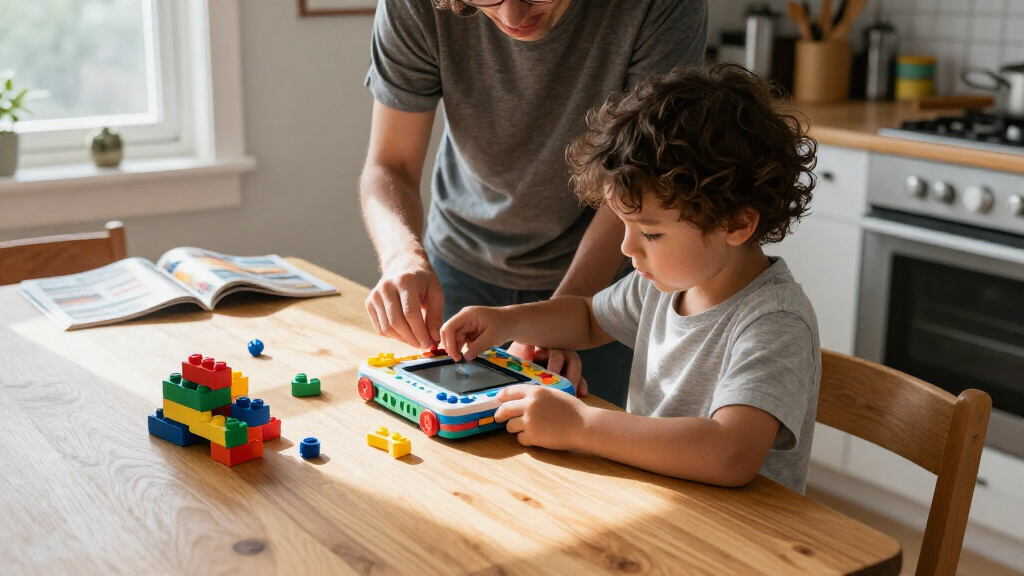
I ranked these toys by how clearly they connect play to coding concepts, how approachable their controls are for the intended age, and how much room they give a child to practice beyond a single activity. I also weighed setup demands, build or accessory requirements, opportunities for open-ended problem-solving, and whether the product’s format suits independent play or works best with an adult nearby.
The ranking favors toys that make cause and effect easy to see while offering enough variety to keep learning moving. That puts a versatile screen-free robot such as Botley 2.0 ahead of narrower command games, while more complex build-and-code kits rank higher for older learners who want deeper projects. I treated related products as distinct options but considered overlap and bundle differences, since a larger activity set can offer more ways to play without changing the core robot.
Factors to Consider When Choosing Educational Coding Toys For Kids
Choosing a coding toy is less about finding the most advanced feature list and more about matching the play style to the child. I would start with how they like to learn, then judge how much adult help, space, and follow-up activity the toy will need.
Match the learning format to the child
Some children learn best by pressing physical buttons and watching a robot move; others prefer building, drawing, or solving a challenge on paper. A screen-free robot can make sequencing visible without asking a young child to read menus, while a programmable building kit rewards patience and tinkering. Avoid choosing only by the word “coding” on the package: the activities may focus more on following directions, spatial reasoning, or construction than writing code. Ask whether your child likes repeating a task to improve it or would rather switch activities quickly. A toy that fits their play habits is more likely to get used than one with more advanced features they rarely reach.
Treat age guidance as a starting point, not a guarantee
Age ranges help flag small parts, reading demands, and expected problem-solving, but children of the same age can have very different skills. Look at the actual interaction: Does the child need to remember a sequence, read instructions, connect pieces, or use a companion device? A younger child may enjoy a robot with simple commands if an adult helps set up the activity, while an older beginner may prefer a structured kit rather than an open-ended coding environment. A common mistake is buying far ahead in the hope that a child will grow into it; if the first steps feel like homework, the toy may sit unused. Choose a modest challenge with room to progress instead.
Decide how much screen involvement you want
Screen-free toys are useful when the goal is to practice instructions and sequences away from a tablet, but they do not automatically teach more than screen-based options. A connected robot may show code visually, save projects, or offer more ways to revise a program, which can suit a child who already uses devices comfortably. Check whether a screen is optional or required for the main activities, and whether setup depends on an app or account. Families sharing devices should also think about access: a toy that needs a phone every session can create friction. Choose based on the kind of practice you want, not on a blanket assumption that screens are always good or bad.
Look beyond the robot to the complete play setup
A toy’s learning experience may depend on cards, tiles, a maze, building pieces, or a clear floor area. More components can add variety, but they also take storage space and may be easy to lose. Before choosing a large activity set, consider whether your child enjoys setting up challenges or wants to start playing right away. Check what is included in the exact version, especially when a product family has both a standalone robot and a larger set. A smaller kit can be the better choice if it will be used often, while extra accessories matter when they create genuinely different tasks rather than duplicates.
Choose between guided lessons and open-ended projects
Guided activities lower the barrier to entry: children can complete a defined challenge and see a clear result. Open-ended toys give more freedom to invent, but younger learners may need prompts to get started. Think about whether the child gets satisfaction from finishing a puzzle or from building something with no single right answer. For a first toy, a mix of structured tasks and room to experiment often works well. If a product mainly offers one style, plan how it fits into the child’s interests rather than assuming any coding activity will hold attention on its own.
Pay for depth only when the child is ready to use it
Buildable robots and more involved programming kits can offer longer-term challenges, but complexity has a cost in setup time, adult help, and troubleshooting. A simple command toy may deliver more learning value for a child who is still mastering left and right or following multi-step directions. For an older child who enjoys construction, paying for a kit with more ways to modify the robot can make sense because the building process becomes part of the lesson. Consider who will help when a project stalls and whether the child can revisit the toy independently. The best fit is the one whose added depth matches a real interest, not merely a higher skill ceiling.
Frequently Asked Questions
Should I choose Botley or Botley 2.0 for a first screen-free coding toy?
Start with the activities and challenge level your child is ready for, rather than assuming the newer model is automatically the better fit. Botley is a straightforward way to introduce command sequences, while Botley 2.0 is positioned as a broader play experience with more room for varied activities. The Botley 2.0 Activity Set may add materials, so check its contents against the standalone version before choosing. If your child is very young or loses interest when setup takes time, a simpler option may be easier to use regularly. For a child who wants more than one basic path challenge, the expanded version is more likely to hold attention.
Can a child learn coding without using a tablet or computer?
Yes. Screen-free toys can teach foundational ideas such as sequencing, debugging, and cause and effect by having children enter commands and observe what happens. They are especially useful when the goal is a tangible first experience rather than typing or editing code on a screen. They do not cover every part of programming, and some children will eventually want tools that let them build more complex programs. A screen-free toy can still be a strong start if you talk through why a sequence worked or where it went wrong. Choose one that invites children to change commands, not just copy a single solution.
Is a coding robot kit a good choice for a child who has never coded?
It can be, but the building and setup demands may matter as much as the coding itself. A kit such as mBot or Mech-5 is a better fit for a beginner who enjoys following construction steps and solving problems over several sessions. A child who wants an immediate result may prefer a button-operated robot or a guided activity first. Check whether assembly requires adult help and whether the coding interface matches the child’s reading and device skills. If the child is curious about robots but not yet patient with construction, begin with a simpler format and move to a kit later.
What should I check before buying a coding toy as a gift?
Confirm the child’s age and interests, then check what is included in the exact product version. Related toys may share a name while one package includes a robot alone and another adds cards, maze pieces, or other activity materials. Also check for app, device, battery, or assembly requirements that could keep the child from starting right away. If you do not know the family’s screen preferences, a clearly screen-free option can reduce uncertainty, though it may not suit an older child seeking more advanced projects. A gift is more likely to land well when the play style matches what the child already enjoys.
How do I choose between a coding toy for preschoolers and one for school-age kids?
Focus on the actions the child can manage independently: pressing directional buttons, following a short sequence, reading a prompt, or assembling pieces. Preschool-oriented options such as Tale-Bot Pro emphasize approachable, concrete interactions, while school-age kits can ask children to plan longer sequences or work through construction and programming steps. A school-age child who is new to coding may still benefit from a simple screen-free toy, so age alone should not push you toward a complex kit. Likewise, a preschooler may enjoy a more advanced toy with adult guidance, but the adult may become part of every session. Pick for the child’s present attention span and interests, with a little room to grow.
Conclusion
My best overall pick is Botley 2.0 for families seeking a screen-free robot with more range than a basic command toy. For beginners, Tale-Bot Pro is a gentle fit for preschoolers, while Code & Go Robot Mouse offers a simpler route into sequencing. I would choose mBot as the best premium-style option for older children who want building alongside coding, and compare the included materials carefully before selecting among Botley bundles. For a specific need, choose Switcheroo Coding Crew for younger learners who benefit from guided play, or Mech-5 for a child drawn to construction. The best choice is the one your child will return to: simple and tangible for a first step, or more involved when they are ready to build and experiment.
Black Friday Picks

Bose QuietComfort Headphones (2nd Gen), Wireless Over-Ear Noise-Cancelling Headphones, Black
As an affiliate, we earn on qualifying purchases.