🔍 Read the full analysis: What Should You Look For In AI Meeting Transcription Software In 2027? on ThorstenMeyerAI.com

Prime made for students and young adults
- Fast, free delivery for dorm and study essentials
- Prime Video and Amazon Music included
- Member-only deals
TL;DR
A product roundup from ThorstenMeyerAI.com compares 13 tools for capturing meetings and turning audio into notes, spanning desk hardware, portable recorders, wearables and transcription software. It favors the HiDock H1E for desk-based note-taking and Philips SpeechExec for a software-focused workflow, but says product listings do not establish accuracy, integrations or subscription terms.
ThorstenMeyerAI.com has compared 13 AI meeting transcription options for readers choosing between desk-based hardware, portable recorders, wearables and dedicated software, as detailed in the original analysis. The roundup recommends the HiDock H1E as a starting point for desk-centered note-taking and Philips SpeechExec for buyers seeking a traditional transcription workflow, while warning that available product listings do not establish transcript accuracy, integrations or subscription terms.
The comparison treats the products as different ways to capture and process meetings, not as interchangeable recorders. Its selection criteria include how easily recording starts, how audio becomes usable notes, and whether the form factor fits a user’s routine. It also considers summaries, translation, storage and dependence on an app or online service. For another overview of AI meeting transcription tools, see the site’s related guide. The source does not provide independent benchmark results or a controlled accuracy test.
Formats range from the HiDock H1E’s desk-oriented dock to standalone software, pocket recorders and wearable devices. The Fieldy 3, a wristband recorder and an Apple Watch-band recorder are presented as options for hands-free capture away from a desk. A pen-shaped recorder and devices listing 64GB or 128GB storage add other form factors, but the roundup cautions that capacity alone does not show whether a tool fits someone’s recording, transfer and transcription workflow.
Translation and transcription are also distinct capabilities. A product listing may refer to live translation, translation after a recording, or translation of an existing transcript. The roundup advises buyers to check which languages are supported and when translation occurs, alongside whether transcripts can be searched, exported and reviewed against audio. Buyers considering dedicated recording devices can also explore AI meeting transcription recorders.
The 13 picks
- 1
 Gem AI Voice Recorder for Apple Watch BandsView on Amazon →
- 2
 AI Voice Recorder with Automatic Transcription and Real-Time TranslationView on Amazon →
- 3
 Philips SpeechExec Transcribe Software, 2-Year Subscription, Version 11.5View on Amazon →
- 4
 Tupuniu AI Voice Recorder with 64GB Storage and TranscriptionView on Amazon →
- 5
 DOWAY AI Voice Recorder and Note Taker, 64GB, Silver GrayView on Amazon →
- 6
 Fieldy 3 AI Wearable Transcriber, BlackView on Amazon →
- 7
 Wearable AI Voice Recorder Wristband with Transcription, Summaries, and Mind…View on Amazon →
- 8
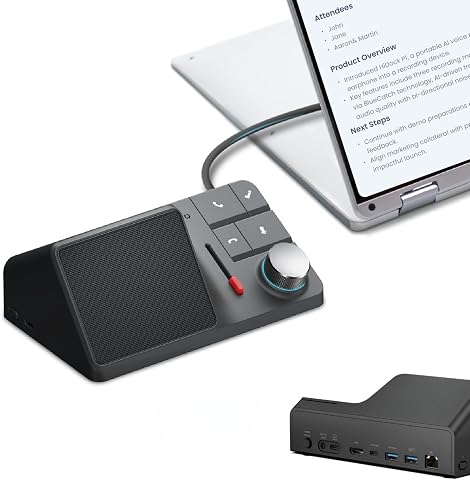 HiDock H1E AI Meeting Note-Taker and 8-in-1 Docking StationView on Amazon →
- 9
 Neyes AI Voice Recorder Pen with Transcription and Real-Time TranslationView on Amazon →
- 10
 viaim NoteKit AI Meeting Voice RecorderView on Amazon →
- 11
 NOTEVOX AI Voice Recorder with 128GB Storage and Transcription AppView on Amazon →
- 12
 RECPOINT AI Voice Recorder with Transcription and SummarizationView on Amazon →
- 13
 AI Voice Recorder with Magnetic Back, Transcription, Summaries, and TranslationView on Amazon →
Choosing for the Whole Meeting Workflow
The comparison matters because a transcription tool is useful only if it works from recording through review and sharing. A device with many listed functions may still be inconvenient to carry, difficult to retrieve transcripts from or dependent on an app that does not suit a team’s habits. Conversely, software-first tools may avoid dedicated hardware but require more setup.
For organizations using transcripts to document decisions, summaries should not be treated as a substitute for checking names, commitments and action items against the recording. Room noise, overlapping speech, microphone placement, accents and technical vocabulary can affect results. Buyers should test a representative meeting before relying on a transcript as an official record, and check how uncertain passages can be replayed.
Recording format also affects workplace practice. A visible desk device, a pocket recorder and a wearable may be used in different settings, but each requires clear policies and appropriate notice to participants. The roundup compares convenience and workflow; it does not settle legal or consent requirements for recording.
Popular right now

iRobot Roomba 105 Combo Robot Vacuum & Mop with AutoEmpty Dock

KitchenAid Artisan Series 5-Quart Tilt-Head Stand Mixer, Milkshake

Bose QuietComfort Wireless Noise-Cancelling Over-Ear Headphones, Twilight Blue
As an affiliate, we earn on qualifying purchases.
How the 13 Options Were Compared
The source says it ranked products by their apparent fit for meeting capture and note-taking, weighing recording access, transcription and summary features, the path from audio to notes, and practical form factor. It placed the HiDock H1E first because it pairs a meeting-note purpose with a desk setup, followed by Philips SpeechExec for software-focused transcription. It describes the other selections through their stated formats and use cases rather than claiming that more features or storage produce better transcripts.
The roundup does not supply named independent tests, measured error rates or confirmed integration and pricing details. Its ranking is therefore best read as buyer guidance based on listed features and workflow fit, not a verified performance league table. Readers should confirm current specifications and terms directly with vendors before purchase.
“Hardware and software solve different problems.”
— ThorstenMeyerAI.com roundup
Performance and Terms Still Need Checking
The source material does not establish how accurately any of the 13 products transcribes realistic meetings, or whether performance varies across languages, accents and noisy rooms. It also does not confirm which products identify speakers, work offline, export to particular team systems, or require an ongoing subscription. Those details may change and should be checked with vendors.
Translation claims are not described in enough detail to establish supported language pairs or whether translation is live or post-recording. The roundup also does not provide a full itemized list of all 13 product names in the supplied material, so its broad format comparisons cannot confirm every product’s current specifications.
What Buyers Should Verify Before Purchase
Before choosing, buyers can map their routine from starting a recording to sharing a checked transcript. They should confirm capture controls, processing location, account requirements, storage and export options, speaker-label availability, supported languages and current pricing. A short trial with representative audio can test recognition of names, specialist terms and overlapping speech.
For sensitive meetings, organizations should also review data handling and retention terms and establish when recording is appropriate. The next meaningful comparison would include current vendor documentation and side-by-side tests on similar audio; the source roundup does not report such results. Until then, its recommendations are starting points, not guarantees of accuracy or fit.
Key Questions
Which tool does the roundup recommend for desk-based meetings?
It names the HiDock H1E as a starting point for buyers who want meeting note-taking combined with a desk dock. The source does not provide independent accuracy test results.
What is the software-focused option?
The roundup points to Philips SpeechExec for buyers who prefer a more traditional transcription software workflow over a dedicated wearable recorder.
Does more storage mean better transcription?
No. The source says storage figures, including listings of 64GB and 128GB, do not by themselves establish transcript quality or whether the transfer and app workflow will suit a user.
What should buyers test before relying on a transcript?
Test a representative recording for the team’s typical room conditions, accents and terminology. Check uncertain text against the audio and verify export, speaker-label and subscription details with the vendor.
Source: ThorstenMeyerAI.com